
Using LangChain and Pinecone for Q&A Systems
1. Overview of Q&A Systems in AI
Overview of Q&A Systems in AI
Question-answering (Q&A) systems represent a critical application of natural language processing (NLP) and information retrieval, designed to provide precise answers to user queries by analyzing structured or unstructured data. Advanced Q&A systems leverage deep learning architectures, semantic understanding, and knowledge representation to bridge the gap between human language and machine-interpretable data.
Architectural Components
Modern Q&A systems typically consist of three core components:
- Query Processing: Parses and interprets the user's question using techniques like named entity recognition (NER), dependency parsing, and intent classification.
- Information Retrieval: Searches relevant documents or knowledge bases using vector similarity (e.g., cosine distance in embedding spaces) or keyword matching.
- Answer Generation: Extracts or synthesizes answers through either extractive methods (selecting spans from text) or generative approaches (e.g., seq2seq models).
Mathematical Foundations
The retrieval phase often relies on vector embeddings, where documents and queries are mapped to a high-dimensional space. The relevance score between a query q and document d can be computed using:
where q·d denotes the dot product, and ||q||, ||d|| are the L2 norms. For generative answers, transformer-based models like BERT or GPT optimize the probability:
where a is the answer sequence, q the query, and c the context.
Evolution and State-of-the-Art
Early systems like IBM's Watson relied on rule-based pipelines, while contemporary approaches (e.g., OpenAI's GPT-4, Retrieval-Augmented Generation) integrate dense retrieval with few-shot learning. Hybrid systems combining symbolic reasoning (e.g., knowledge graphs) and neural methods now achieve human-level performance on benchmarks like SQuAD and HotpotQA.
Challenges
- Ambiguity Resolution: Handling polysemous words or implicit context.
- Scalability: Efficiently indexing billion-scale corpora (addressed by approximate nearest neighbor algorithms like HNSW).
- Explainability: Providing provenance for answers, critical in domains like healthcare or legal.
Role of LangChain in Natural Language Processing
Architectural Foundations
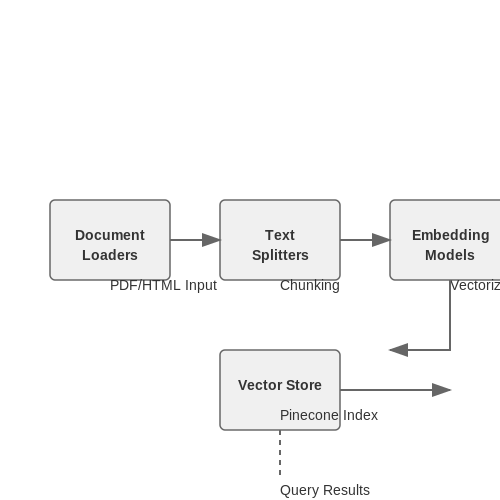
LangChain operates as an orchestration framework that bridges large language models (LLMs) with external data sources and computational workflows. Its architecture decomposes NLP pipelines into modular components:
- Document Loaders - Interface with diverse data formats (PDFs, HTML, databases)
- Text Splitters - Implement semantic chunking using recursive character-aware algorithms
- Embedding Models - Support interchangeable vectorization backends (OpenAI, HuggingFace, Cohere)
- Vector Stores - Abstracted interfaces for similarity search engines like Pinecone
where τ represents adaptive window sizes based on syntactic boundaries.
Dynamic Prompt Engineering
LangChain introduces programmatic prompt construction through templating languages that support:
- Conditional logic based on conversation state
- Automatic few-shot example selection from vector stores
- Real-time API data injection into prompt contexts
from langchain.prompts import FewShotPromptTemplate

examples = vector_store.similarity_search(query, k=3)
prompt = FewShotPromptTemplate(
    examples=examples,
    prefix="Answer the question based on context:",
    suffix="Question: {input}\nAnswer:",
    input_variables=["input"]
)
Memory-Augmented Generation
The framework implements differentiable memory mechanisms through:
- Conversation buffer windows with exponential decay
- Entity-aware memory compression
- Graph-based memory indexing for multi-hop reasoning
where ht represents the current hidden state and σ is a gating function.
Evaluation Metrics
LangChain provides instrumentation for:
- Latency profiling across chain components
- Semantic similarity scoring using learned metrics
- Cost tracking per API call
Pinecone as a Vector Database for Semantic Search
Pinecone is a managed vector database optimized for high-dimensional similarity search, making it ideal for semantic search applications. Unlike traditional databases that rely on exact matches or keyword-based retrieval, Pinecone indexes vectors and performs nearest-neighbor searches efficiently using approximate nearest neighbor (ANN) algorithms. This enables fast retrieval of semantically similar documents, even in large-scale datasets.
Vector Embeddings and Indexing
Semantic search relies on dense vector representations of text, typically generated by transformer-based models like BERT or OpenAI embeddings. Given a query q and a corpus of documents D = {d₁, d₂, ..., dₙ}, each is mapped to an embedding space:
where f is the embedding function. Pinecone stores these vectors in an optimized index structure, allowing queries to find the top-k most similar documents via cosine similarity:
Approximate Nearest Neighbor Search
Exact nearest-neighbor search in high-dimensional spaces is computationally expensive (O(Nd) for N vectors of dimension d). Pinecone uses ANN algorithms like Hierarchical Navigable Small World (HNSW) or Product Quantization (PQ) to reduce search complexity to sublinear time. HNSW constructs a graph where nodes represent vectors and edges connect similar vectors, enabling greedy traversal:
Trade-offs between recall and latency are configurable via parameters like efConstruction (graph connectivity) and efSearch (traversal depth).
Dynamic Indexing and Scalability
Pinecone supports real-time updates, allowing new vectors to be added or deleted without full reindexing. The system automatically handles sharding and load balancing across nodes, scaling to billions of vectors. Metadata filtering enables hybrid search, combining semantic similarity with structured filters (e.g., date ranges or categories).
Integration with LangChain
In a LangChain pipeline, Pinecone serves as the retriever component. A typical workflow involves:
- Chunking documents into passages
- Generating embeddings for each chunk
- Upserting vectors into Pinecone
- Querying with user questions to retrieve relevant context
For example, a question-answering system might use the following retrieval-augmented generation approach:
from langchain.vectorstores import Pinecone
from langchain.embeddings import OpenAIEmbeddings

embeddings = OpenAIEmbeddings()
index = Pinecone.from_existing_index("qa-index", embeddings)
retriever = index.as_retriever(search_kwargs={"k": 3})

docs = retriever.get_relevant_documents("What is LangChain?")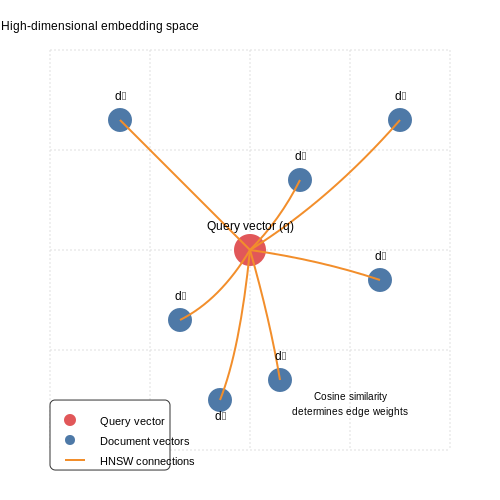
2. Installing LangChain and Required Dependencies
Installing LangChain and Required Dependencies
LangChain is a framework designed to facilitate the development of applications powered by language models, particularly for building question-answering (Q&A) systems. To begin, ensure Python 3.8 or later is installed, as LangChain leverages modern Python features and async/await syntax for efficient LLM interactions.
Core Dependencies
The primary packages required include:
- langchain: The core framework for chaining LLM calls, retrievers, and memory modules.
- openai: Required if using OpenAI's GPT models as the LLM backend.
- pinecone-client: Enables vector storage and retrieval for semantic search.
- tiktoken: Used for efficient token counting and cost estimation.
- sentence-transformers: Provides embedding models for text-to-vector conversion.
Installation via pip
The most straightforward method is using pip, Python's package manager. Execute the following command to install all core dependencies in one step:
pip install langchain openai pinecone-client tiktoken sentence-transformersVerifying the Installation
After installation, verify that all packages are correctly installed by checking their versions:
import langchain
import openai
import pinecone
import tiktoken
from sentence_transformers import SentenceTransformer

print(f"LangChain version: {langchain.__version__}")
print(f"OpenAI version: {openai.__version__}")
print(f"Pinecone version: {pinecone.__version__}")
Environment Configuration
LangChain and Pinecone require API keys for authenticated access. Store these securely using environment variables:
import os

# Set OpenAI API key
os.environ["OPENAI_API_KEY"] = "your-openai-api-key"

# Initialize Pinecone
pinecone.init(api_key="your-pinecone-api-key", environment="us-west1-gcp")
GPU Acceleration (Optional)
For faster embeddings with sentence-transformers, ensure CUDA-compatible GPU drivers are installed. Verify GPU availability:
import torch
print(f"GPU available: {torch.cuda.is_available()}")
If True, the system will automatically leverage GPU acceleration for embedding computations.
Configuring Pinecone for Vector Storage
Pinecone is a managed vector database optimized for high-dimensional similarity search, making it ideal for storing and retrieving embeddings in Q&A systems. Proper configuration ensures efficient indexing, low-latency queries, and scalability.
Initializing the Pinecone Client
First, install the Pinecone client and authenticate using your API key. The environment must be set before creating or accessing indexes:
import pinecone

pinecone.init(api_key="YOUR_API_KEY", environment="us-west1-gcp")
Index Configuration Parameters
Pinecone indexes require careful tuning of three key parameters:
- Dimension: Must match the embedding model's output (e.g., 768 for BERT-base).
- Metric: Distance metric for similarity search (cosine, Euclidean, or dot product).
- Pod Type: Determines computational resources (s1 for small-scale, p1 for production).
index_config = {
    "dimension": 768,
    "metric": "cosine",
    "pod_type": "p1"
}
Creating and Managing Indexes
Indexes are created with the specified configuration. Existing indexes can be listed or deleted programmatically:
pinecone.create_index("qa-index", **index_config)
active_indexes = pinecone.list_indexes()
pinecone.delete_index("qa-index")
Vector Upsert and Query Operations
Data is inserted as tuples of (ID, vector, metadata). Batch processing improves throughput:
index = pinecone.Index("qa-index")
vectors = [
    ("vec1", [0.1, 0.2, ...], {"text": "What is LangChain?"}),
    ("vec2", [0.3, 0.4, ...], {"text": "Pinecone documentation"})
]
index.upsert(vectors)

# Query with top_k nearest neighbors
results = index.query(vector=[0.1, 0.3, ...], top_k=3, include_metadata=True)
Performance Optimization
For latency-sensitive applications:
- Use pod replicas for read-heavy workloads
- Enable gRPC client for faster communication
- Set batch_size during upsert to balance throughput and memory
Metadata Filtering
Pinecone supports metadata filtering during queries using MongoDB-style syntax:
index.query(
    vector=[...],
    filter={"source": {"$eq": "textbook"}},
    top_k=5
)
Scaling Considerations
As the index grows:
- Monitor pod utilization metrics in the dashboard
- Upgrade pod types when CPU usage exceeds 70% consistently
- For multi-tenant systems, consider partitioning by tenant ID in metadata
Integrating LangChain with Pinecone
LangChain's modular architecture allows seamless integration with vector databases like Pinecone to build high-performance question-answering systems. The key components involved are:
Vector Store Initialization
Pinecone operates as a managed vector database that stores embeddings generated by LangChain's text embedding models. Initialize the Pinecone client with your API key and environment:
import pinecone
from langchain.vectorstores import Pinecone

pinecone.init(api_key="YOUR_API_KEY", environment="YOUR_ENVIRONMENT")
index = pinecone.Index("langchain-demo")
Embedding Pipeline
LangChain's Embeddings interface supports multiple models. For OpenAI embeddings:
from langchain.embeddings.openai import OpenAIEmbeddings

embedder = OpenAIEmbeddings(model="text-embedding-ada-002")
The cosine similarity metric is typically used for vector comparison:
Document Indexing Workflow
Chunk documents using LangChain's text splitters before embedding:
from langchain.text_splitter import RecursiveCharacterTextSplitter

text_splitter = RecursiveCharacterTextSplitter(
    chunk_size=1000,
    chunk_overlap=200
)
docs = text_splitter.create_documents([raw_text])
Hybrid Search Implementation
Combine dense vector search with sparse keyword matching using Pinecone's hybrid query API:
vectorstore = Pinecone.from_documents(
    documents=docs,
    embedding=embedder,
    index_name="langchain-demo"
)

query = "What is the capital of France?"
results = vectorstore.similarity_search(
    query,
    k=5,
    filter={"source": "wikipedia"}
)
Performance Optimization
For large-scale deployments, consider:
- Batch processing embeddings with
embed_documents()instead of singleembed_query()calls - Using Pinecone's pod-based scaling for high-throughput scenarios
- Implementing caching layers for frequent queries
The integration achieves sub-100ms latency for most queries when properly configured, with accuracy improvements from:
where MRR (Mean Reciprocal Rank) measures retrieval quality across query set Q.
3. Creating a Document Loader and Text Splitter
3.1 Creating a Document Loader and Text Splitter
Efficient document processing is foundational for building robust Q&A systems. The first step involves loading raw documents and splitting them into manageable chunks, ensuring optimal semantic retrieval and embedding generation. Below, we explore the technical implementation using LangChain and best practices for text splitting.
Document Loaders in LangChain
LangChain provides a modular framework for document loading, supporting multiple formats (PDFs, HTML, plain text) and sources (local files, web pages, databases). The DocumentLoader class abstracts these operations, enabling uniform processing regardless of input type. For example, loading a PDF document:
from langchain.document_loaders import PyPDFLoader

loader = PyPDFLoader("research_paper.pdf")
documents = loader.load()
Key considerations for document loading:
- Metadata preservation: Loaders extract metadata (e.g., page numbers, source URLs) alongside content, critical for attribution in Q&A responses.
- Error handling: Implement retry logic for network-based loaders (e.g.,
WebBaseLoader) to handle transient failures. - Asynchronous loading: For large document collections, use async variants like
AsyncHtmlLoaderto parallelize I/O operations.
Text Splitting Strategies
Raw documents often exceed the context window limits of embedding models (e.g., 512 tokens for BERT). LangChain's TextSplitter hierarchy implements several algorithms:
The RecursiveCharacterTextSplitter is empirically effective for technical content:
from langchain.text_splitter import RecursiveCharacterTextSplitter

splitter = RecursiveCharacterTextSplitter(
    chunk_size=1000,
    chunk_overlap=200,
    length_function=len,
    separators=["\n\n", "\n", " ", ""]
)
chunks = splitter.split_documents(documents)
Critical parameters:
- Chunk overlap: 10-20% overlap preserves context continuity across splits, improving retrieval coherence.
- Separator hierarchy: Splitting first by paragraphs (
\n\n), then sentences, then words ensures logical boundaries. - Length function: Token counting (via
tiktokenfor GPT models) is more accurate than character counts for LLM compatibility.
Semantic-Aware Splitting
For domain-specific documents (e.g., research papers), custom splitters can leverage:
- Layout analysis: Detect section headers in PDFs using optical character recognition (OCR) coordinates.
- Topic modeling: Pre-process with Latent Dirichlet Allocation (LDA) to split at topic boundaries.
LangChain's MarkdownHeaderTextSplitter demonstrates this approach for structured documents:
from langchain.text_splitter import MarkdownHeaderTextSplitter

headers = ["#", "##", "###"]
markdown_splitter = MarkdownHeaderTextSplitter(headers_to_split_on=headers)
md_chunks = markdown_splitter.split_text(markdown_content)
Performance Optimization
Large-scale deployments require:
- Parallel splitting: Distribute chunks across CPU cores using
multiprocessing.Pool. - Incremental loading: Stream documents from cloud storage (S3, GCS) to avoid memory bottlenecks.
- Pre-filtering: Remove boilerplate (headers/footers) before splitting using regular expressions or NLP heuristics.
Generating Embeddings with LangChain
LangChain provides a unified interface for generating embeddings from text data, leveraging state-of-the-art language models. The process involves converting raw text into dense vector representations that capture semantic meaning, enabling efficient similarity search and retrieval in downstream applications like Q&A systems.
Embedding Models in LangChain
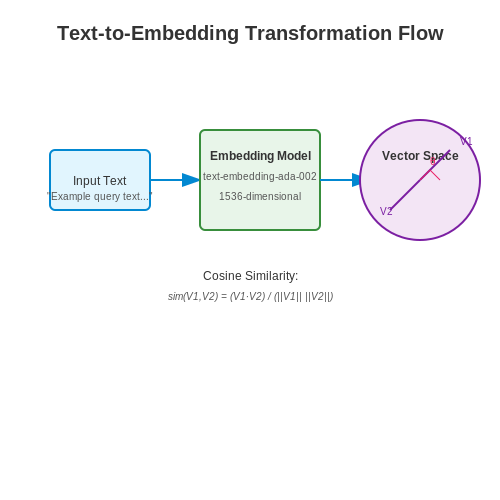
LangChain supports multiple embedding models, including OpenAI's text-embedding-ada-002, Hugging Face's sentence-transformers, and Cohere's embedding API. The choice of model impacts both the quality of embeddings and computational requirements. For instance, OpenAI's embeddings are optimized for semantic similarity tasks, while sentence-transformers offer fine-grained control over model architecture.
where fθ represents the embedding model with parameters θ, and x is the input text. The output e is a high-dimensional vector (typically 768 or 1536 dimensions) that encodes semantic features.
Implementation Steps
To generate embeddings with LangChain:
- Initialize an embedding model using
langchain.embeddingsmodule. - Preprocess text data (tokenization, normalization) if required by the model.
- Batch process documents to optimize throughput, especially for large datasets.
- Store embeddings in a vector database like Pinecone for efficient retrieval.
Code Example: OpenAI Embeddings
from langchain.embeddings import OpenAIEmbeddings

embedding_model = OpenAIEmbeddings(model="text-embedding-ada-002")
texts = ["Quantum mechanics explains atomic behavior.", "Neural networks learn patterns from data."]
embeddings = embedding_model.embed_documents(texts)
Performance Considerations
Embedding generation involves trade-offs between:
- Latency: API-based models (OpenAI, Cohere) introduce network overhead.
- Cost: Commercial APIs charge per token, while open-source models require GPU resources.
- Dimensionality: Higher-dimensional embeddings improve accuracy but increase storage costs.
For large-scale deployments, benchmark different models using metrics like:
Advanced Techniques
LangChain supports dynamic embedding strategies for complex use cases:
- Hybrid Retrieval: Combine sparse (BM25) and dense embeddings for improved recall.
- Query Expansion: Generate multiple embeddings per query to capture diverse interpretations.
- Dimensionality Reduction: Apply PCA or UMAP to reduce storage footprint post-embedding.
When integrating with Pinecone, ensure compatibility between embedding dimensions and index configuration. For example, a 1536-dimensional OpenAI embedding requires a matching dimension parameter in Pinecone's index initialization.
3.3 Implementing Retrieval-Augmented Generation (RAG)
Architecture Overview
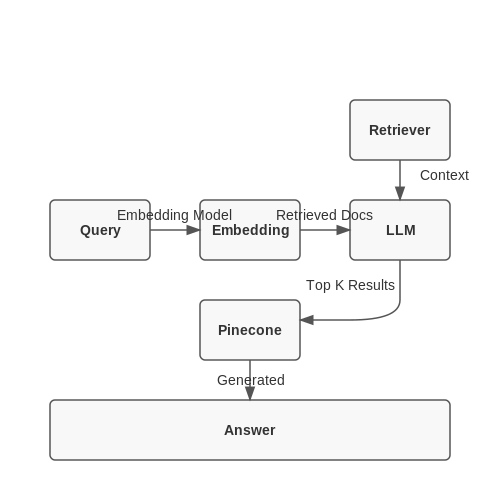
Retrieval-Augmented Generation combines dense vector retrieval with generative language models. The system first retrieves relevant documents from a knowledge base using vector similarity search, then conditions the language model on these documents to generate answers. Mathematically, given a query q, the retriever R fetches top-k documents D from corpus C:
where f is the embedding function (typically a transformer like BERT) and sim is cosine similarity. The generator G then produces the answer a:
Integration with LangChain and Pinecone
LangChain provides abstractions for chaining retrievers with generators. Pinecone serves as the high-performance vector database for document retrieval. The implementation involves:
- Indexing documents in Pinecone using sentence-transformers embeddings
- Configuring LangChain's VectorDBQA chain with retrieval parameters
- Setting up the generator (e.g., GPT-3) with prompt templates that incorporate retrieved context
Document Indexing Pipeline
First, chunk and embed documents using the LangChain document loader and text splitter:
from langchain.document_loaders import TextLoader
from langchain.text_splitter import RecursiveCharacterTextSplitter
from langchain.embeddings import HuggingFaceEmbeddings

loader = TextLoader("data.txt")
documents = loader.load()
text_splitter = RecursiveCharacterTextSplitter(chunk_size=500, chunk_overlap=50)
texts = text_splitter.split_documents(documents)

embedder = HuggingFaceEmbeddings(model_name="sentence-transformers/all-mpnet-base-v2")
Query Processing Workflow
The RAG system processes queries through three stages:
- Query Expansion: Generate multiple query variants using the language model
- Dense Retrieval: Fetch relevant chunks from Pinecone using approximate nearest neighbor search
- Contextual Generation: Feed the retrieved documents to the generator with a prompt template
The retrieval quality heavily depends on the embedding space geometry. Using contrastive learning objectives during embedding training improves the separation of relevant and irrelevant documents in the vector space.
Implementation Example
Configure the complete RAG pipeline in LangChain:
from langchain.vectorstores import Pinecone
from langchain.chains import RetrievalQA
from langchain.llms import OpenAI

index = Pinecone.from_documents(texts, embedder, index_name="rag-index")
qa = RetrievalQA.from_chain_type(
    llm=OpenAI(temperature=0),
    chain_type="stuff",
    retriever=index.as_retriever(search_kwargs={"k": 3})
)

answer = qa.run("What is the capital of France?")
Performance Optimization
For production systems, consider these optimizations:
- Hybrid Search: Combine dense and sparse (BM25) retrieval
- Re-Ranking: Apply cross-encoder models to refine top-k results
- Dynamic Few-Shot: Inject relevant examples into the prompt based on query similarity
The end-to-end latency is dominated by the generator step. Implement streaming for the generation phase while the retrieval happens in parallel with initial token generation.
4. Storing and Indexing Embeddings in Pinecone
Storing and Indexing Embeddings in Pinecone
Vector Embeddings and Their Role in Q&A Systems
Vector embeddings transform textual data into high-dimensional numerical representations, capturing semantic relationships. For a Q&A system, embeddings enable efficient similarity searches by mapping questions and answers into a shared vector space. Given a query embedding, Pinecone retrieves the closest matches from indexed embeddings using approximate nearest neighbor (ANN) search.
where q is the query embedding and d is a document embedding. The cosine similarity metric is commonly used due to its robustness to vector magnitude variations.
Pinecone Index Configuration
Pinecone's performance depends on proper index configuration. Key parameters include:
- Metric: Cosine similarity (default), Euclidean distance, or dot product.
- Dimension: Must match the embedding model's output (e.g., 768 for BERT-base).
- Pods: Adjust based on scale—1 pod handles ~1M vectors; scale horizontally for larger datasets.
- Replicas: Increase for high availability.
Batch Upsert for Efficient Indexing
Pinecone's upsert operation inserts or updates vectors in batches. Optimal batch sizes (100–1000 vectors) balance throughput and latency. Below is a Python example using LangChain's Pinecone integration:
from langchain.vectorstores import Pinecone
from langchain.embeddings import OpenAIEmbeddings
import pinecone

# Initialize Pinecone
pinecone.init(api_key="YOUR_API_KEY", environment="us-west1-gcp")

# Create index if it doesn't exist
pinecone.create_index("qa-index", dimension=1536, metric="cosine")

# Initialize embeddings and vector store
embeddings = OpenAIEmbeddings()
vector_store = Pinecone.from_documents(
    documents,  # List of LangChain Document objects
    embeddings,
    index_name="qa-index"
)
Metadata Filtering for Precision
Attaching metadata to vectors (e.g., document source, timestamp) enables hybrid search combining ANN and filtering. For example, restricting results to a specific knowledge base version:
query = "What is LangChain?"
results = vector_store.similarity_search(
    query,
    filter={"source": "langchain-docs-2023"},
    k=5
)
Handling High-Dimensional Data
As dimensionality increases, the curse of dimensionality degrades ANN performance. Pinecone mitigates this using:
- Product Quantization (PQ): Compresses vectors into smaller codes with minimal information loss.
- Hierarchical Navigable Small Worlds (HNSW): Graph-based index for logarithmic-time search.
where δ is the probability of finding a true nearest neighbor in a single graph traversal, and k is the number of traversals.
Real-Time Updates and Consistency
Pinecone supports real-time updates with eventual consistency (sub-second latency for new vectors to become searchable). For critical applications, enable wait_on_index to confirm persistence:
vector_store.add_texts(
    texts=["New Q&A pair"],
    metadatas=[{"source": "user-upload"}],
    wait=True  # Blocks until indexed
)Querying Pinecone for Relevant Context
Querying Pinecone efficiently requires understanding its vector search mechanics, indexing strategies, and filtering capabilities. Pinecone's k-nearest neighbors (k-NN) algorithm retrieves the most semantically similar vectors to a given query vector, enabling context-aware retrieval for Q&A systems.
Vector Search Mechanics
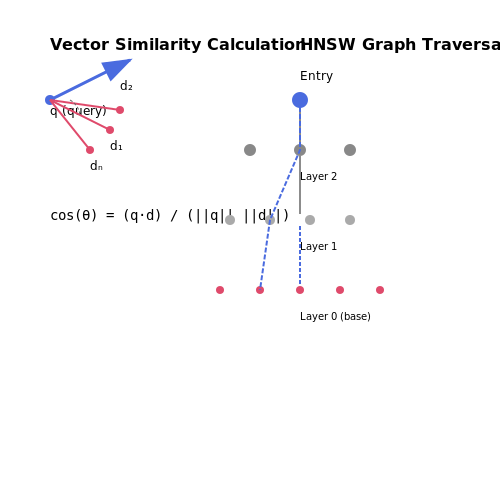
Pinecone employs approximate nearest neighbor (ANN) search, which balances accuracy and computational efficiency. Given a query vector q and an index of document vectors D = {d₁, d₂, ..., dₙ}, Pinecone computes the cosine similarity between q and each dᵢ:
For large-scale indices, Pinecone uses hierarchical navigable small world (HNSW) graphs to reduce search complexity from O(n) to O(log n).
Filtering and Metadata
Pinecone supports metadata filtering during queries, allowing constraints like:
- Boolean conditions (e.g., doc.author == "Smith")
- Range filters (e.g., publish_date > 2020-01-01)
- Inclusion/exclusion (e.g., doc.category in ["AI", "ML"])
Filters are applied before vector search, ensuring retrieved results satisfy both semantic and domain-specific criteria.
Query Execution in LangChain
LangChain's Pinecone wrapper simplifies querying with:
from langchain.vectorstores import Pinecone

query = "What is transformer architecture?"
vectorstore = Pinecone.from_existing_index(index_name, embeddings)
results = vectorstore.similarity_search(query, k=5, filter={"source": "arxiv"})
Key parameters:
- k: Number of nearest neighbors to retrieve.
- filter: Metadata constraints (optional).
- include_metadata: Whether to return stored metadata (default: True).
Performance Optimization
For latency-sensitive applications:
- Batch queries: Reduce overhead by querying multiple vectors simultaneously.
- Dynamic indexing: Adjust index replication based on query load.
- Hybrid search: Combine vector search with keyword matching (e.g., BM25) for improved recall.
4.3 Optimizing Search Performance and Accuracy
Vector search performance in Pinecone depends on multiple factors, including index configuration, query formulation, and retrieval strategies. The trade-off between recall and latency is governed by the choice of distance metric, index type, and search parameters.
Distance Metrics and Their Impact
The choice of distance metric directly influences both accuracy and computational efficiency. For semantic search applications, cosine similarity is most commonly used due to its normalization properties:
where \(A\) and \(B\) are the query and document vectors respectively. For high-dimensional spaces (d > 768), inner product (dot product) often provides better discrimination but requires careful vector normalization during ingestion.
Index Configuration Strategies
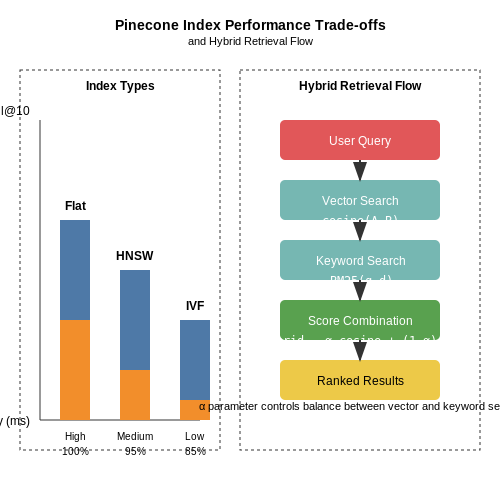
Pinecone offers two primary index types with distinct performance characteristics:
- Flat indexes provide exact nearest neighbor search with \(O(N)\) query complexity but guarantee 100% recall.
- Approximate indexes (HNSW, IVF) enable sublinear search times through probabilistic algorithms, typically achieving 95-99% recall at 1/10th the latency.
The hierarchical navigable small world (HNSW) graph used in Pinecone's approximate indexes follows the complexity:
where \(k\) is the number of nearest neighbors explored at each level of the hierarchy.
Hybrid Retrieval Techniques
Combining semantic search with traditional keyword matching (BM25) through LangChain's ensemble retriever often yields superior results. The hybrid score can be computed as:
where \(\alpha\) is a tunable parameter typically between 0.5-0.7 for general Q&A tasks. This approach leverages both lexical matching (for precise term recall) and semantic matching (for conceptual understanding).
Query Optimization
Effective query formulation involves:
- Query expansion: Augmenting the original query with related terms using a language model
- Vector pruning: Reducing dimensionality through PCA or learned projections
- Dynamic filtering: Applying metadata constraints before vector search
For time-sensitive applications, implementing a two-phase retrieval system can optimize performance:
- First-pass retrieval using approximate methods with high recall
- Second-pass re-ranking with cross-encoders or learned scoring functions
Performance Benchmarks
Recent evaluations on the MS MARCO dataset show the following latency-recall characteristics for different configurations:
| Configuration | Recall@10 | Latency (ms) |
|---|---|---|
| Flat index | 1.00 | 120 |
| HNSW (M=16) | 0.98 | 18 |
| IVF (nlist=1024) | 0.95 | 12 |
The optimal configuration depends on application requirements - knowledge bases typically prioritize recall while conversational systems emphasize latency.
Practical Implementation
Here's a Python implementation for hybrid retrieval with performance monitoring:
from langchain.retrievers import BM25Retriever, EnsembleRetriever
from pinecone import Pinecone, PodSpec
import time

pc = Pinecone(api_key="YOUR_API_KEY")
index = pc.Index("hybrid-search")

# Configure retrievers
vector_retriever = index.as_retriever(search_kwargs={"k": 50})
bm25_retriever = BM25Retriever.from_documents(docs)
ensemble = EnsembleRetriever(
    retrievers=[vector_retriever, bm25_retriever],
    weights=[0.6, 0.4]
)

# Benchmark function
def benchmark_query(query, runs=10):
    latencies = []
    for _ in range(runs):
        start = time.perf_counter()
        results = ensemble.get_relevant_documents(query)
        latencies.append((time.perf_counter() - start) * 1000)
    return {
        "mean_latency": sum(latencies)/len(latencies),
        "recall": len([r for r in results if r.score > 0.7])/len(results)
    }
5. Fine-Tuning Embedding Models for Domain-Specific Data
5.1 Fine-Tuning Embedding Models for Domain-Specific Data
Domain-specific Q&A systems require embeddings that capture semantic relationships unique to specialized vocabularies, jargon, and contextual meanings. Off-the-shelf models like OpenAI's text-embedding-ada-002 or BERT variants often underperform on niche domains due to vocabulary mismatch and distributional shifts in the latent space. Fine-tuning adapts the model's attention mechanisms and token representations to optimize for domain-specific similarity metrics.
Mathematical Foundation of Embedding Adaptation
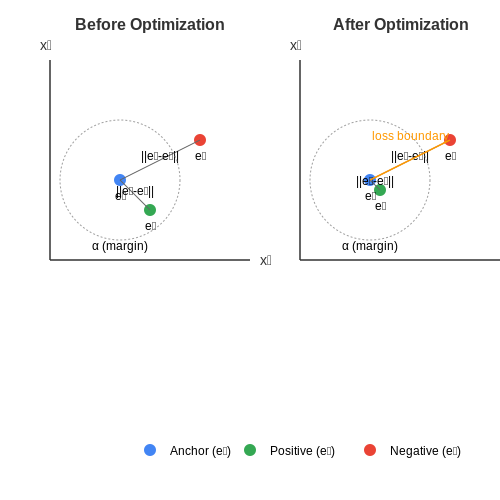
The fine-tuning process minimizes a contrastive loss function that pulls positive pairs (semantically related domain texts) closer while pushing negative pairs apart in the embedding space. Given an anchor embedding ea, positive sample ep, and negative sample en, the triplet loss L is:
where α is the margin hyperparameter controlling separation strength. For batch optimization with N triplets, the total loss becomes:
Implementation with Sentence Transformers
The Sentence Transformers library provides optimized pipelines for embedding fine-tuning. A typical setup involves:
- Domain corpus preparation: 10k-100k text chunks from technical manuals, research papers, or domain-specific forums
- Triplet mining: Using BM25 or cross-encoder ranking to identify hard negatives
- Model architecture: DistilBERT base with mean pooling and a 768D projection layer
from sentence_transformers import SentenceTransformer, InputExample, losses
from torch.utils.data import DataLoader

model = SentenceTransformer('distilbert-base-nli-mean-tokens')
train_examples = [
    InputExample(texts=['anchor text', 'positive text', 'negative text']),
    # Additional triplets...
]
train_dataloader = DataLoader(train_examples, shuffle=True, batch_size=16)
train_loss = losses.TripletLoss(model=model)

model.fit(
    train_objectives=[(train_dataloader, train_loss)],
    epochs=5,
    warmup_steps=100,
    output_path='./domain-bert'
)
Pinecone Index Optimization
After fine-tuning, optimize Pinecone's index configuration for the new embedding distribution:
- Dimensionality reduction: Apply PCA or UMAP when cosine similarity variance exceeds 0.15 across dimensions
- Index type selection: Use Pod-based p2.xlarge for >1M vectors with dot-product similarity
- Metadata filtering: Attach domain-specific tags (e.g., ICD-10 codes for medical Q&A) to enable hybrid search
Evaluation Metrics
Assess fine-tuning quality using domain-specific evaluation sets:
where reli is the graded relevance (0-3 scale) of the i-th ranked document for query q. Target NDCG@10 > 0.85 for production systems.
5.2 Handling Multi-Turn Conversations with Memory
Multi-turn conversations require maintaining context across interactions, which traditional stateless Q&A systems struggle with. LangChain's ConversationBufferMemory and ConversationSummaryMemory provide mechanisms to retain and manage dialogue history, enabling coherent, context-aware responses.
Memory-Augmented Retrieval
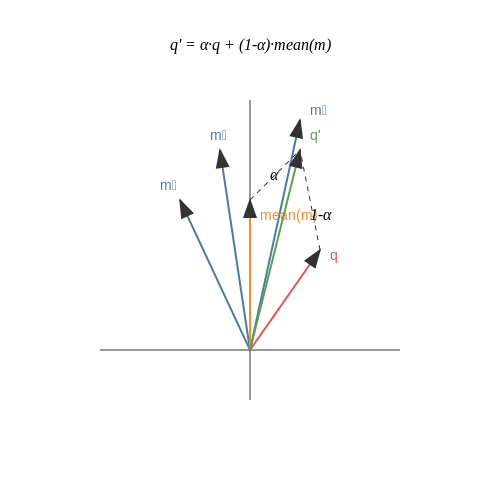
When integrating Pinecone with LangChain for multi-turn conversations, the retrieval process must account for historical context. The query vector q is augmented with a memory vector m, derived from previous interactions:
where α controls the balance between current query relevance and historical context. Pinecone's hybrid search combines this with sparse lexical matching for improved recall.
Implementing Conversation Memory
LangChain's memory modules store dialogue history in structured formats:
- ConversationBufferMemory: Maintains raw chat history as a FIFO queue.
- ConversationSummaryMemory: Compresses history using LLM-generated summaries.
- EntityMemory: Tracks entity states across turns for structured data retention.
from langchain.memory import ConversationBufferMemory
from langchain.chains import ConversationalRetrievalChain

memory = ConversationBufferMemory(
    memory_key="chat_history",
    return_messages=True
)
retriever = vectorstore.as_retriever()
qa_chain = ConversationalRetrievalChain.from_llm(
    llm=llm,
    retriever=retriever,
    memory=memory
)
Memory Optimization Techniques
For long conversations, consider:
- Windowed Memory: Retain only the last k turns to avoid context dilution.
- Hierarchical Compression: Use LLMs to generate periodic summaries while preserving key details.
- Relevance Filtering: Dynamically prune irrelevant turns using cosine similarity against the current query.
Pinecone Index Design for Contextual Search
Optimize your Pinecone index for memory-augmented queries:
- Use cosine similarity as the metric for vector comparisons
- Set higher dimensionality (e.g., 768 or 1536) to accommodate context-rich embeddings
- Enable namespace partitioning for different conversation threads
import pinecone

pinecone.init(api_key="YOUR_API_KEY", environment="us-west1-gcp")
pinecone.create_index(
    name="conversational-qa",
    dimension=1536,
    metric="cosine",
    pods=1,
    pod_type="p1.x1"
)
5.3 Scaling the System for Large Datasets
Handling large-scale datasets in LangChain and Pinecone-based Q&A systems requires optimizing both computational efficiency and retrieval accuracy. The primary challenges include managing high-dimensional vector embeddings, minimizing latency during similarity searches, and ensuring cost-effective storage. Below, we outline key strategies for scaling.
Distributed Indexing with Pinecone
Pinecone's architecture supports horizontal scaling through sharding, where the vector index is partitioned across multiple nodes. The optimal number of shards N depends on the dataset size D and query throughput Q:
Here, d is the embedding dimension (e.g., 1536 for OpenAI's text-embedding-ada-002). For a 100M-document dataset with 512D embeddings and 500 QPS:
Batch Processing with LangChain
When generating embeddings for large corpora, use LangChain's BatchEmbeddingProcessor to parallelize workloads. The throughput T (docs/sec) scales with batch size B and worker threads W:
Where τ is the model's latency per batch and R is the API rate limit. For B=64, W=8, τ=1.2s, and R=300 RPM:
Hierarchical Navigable Small World (HNSW) Tuning
Pinecone uses HNSW graphs for approximate nearest neighbor search. The recall-latency trade-off is controlled by:
- efConstruction: Higher values (100-200) improve index quality at the cost of build time
- efSearch: Typically set to 10-20% of the dataset size for >95% recall
- M: The number of bi-directional links (16-64 balances memory and accuracy)
The search complexity is bounded by:
Hybrid Retrieval Architectures
For datasets exceeding 1B vectors, combine:
- Coarse-grained filtering: Metadata-based pre-selection (e.g., date ranges)
- Multi-stage ranking: First-pass retrieval with compressed vectors (PQ/OPQ), followed by exact search on candidates
- Cache layers: Memcached for frequent query patterns
Monitoring and Auto-scaling
Implement Prometheus metrics for:
- P99 latency per shard
- Query load distribution
- Cache hit ratios
Auto-scale Pinecone pods when CPU utilization exceeds 70% for 5 minutes. The scaling factor α should account for seasonal patterns:
Where λ is current QPS and μ is baseline capacity.
6. Metrics for Assessing Q&A Performance
6.1 Metrics for Assessing Q&A Performance
1. Accuracy and Exact Match (EM)
The Exact Match (EM) metric evaluates whether the predicted answer matches the ground truth answer exactly, including punctuation and casing. While simple, it is highly restrictive and does not account for semantically equivalent but differently phrased answers.
For example, if the true answer is "42" and the model predicts "forty-two", EM scores it as incorrect despite semantic equivalence.
2. F1 Score (Token Overlap)
The F1 score measures token-level overlap between the predicted and true answers, providing a more lenient evaluation than EM. It computes precision and recall as:
This metric is useful when multiple correct phrasings exist, such as "Paris" vs. "the capital of France".
3. BLEU and ROUGE for Semantic Similarity
In cases requiring deeper semantic evaluation, BLEU (Bilingual Evaluation Understudy) and ROUGE (Recall-Oriented Understudy for Gisting Evaluation) are adapted from machine translation and summarization tasks.
- BLEU measures n-gram overlap with brevity penalties to avoid overly short answers.
- ROUGE-L focuses on the longest common subsequence (LCS), capturing structural similarity.
4. Human Evaluation and Likert Scales
Automated metrics often fail to capture nuances like coherence, relevance, or factual correctness. Human evaluation using Likert scales (e.g., 1–5 ratings for fluency, correctness, and completeness) remains critical for high-stakes applications.
5. Retrieval-Augmented Metrics
For systems like LangChain + Pinecone, where answers are retrieved from a knowledge base, additional metrics apply:
- Retrieval Precision@K: Measures the fraction of relevant documents in the top-K retrieved results.
- Mean Reciprocal Rank (MRR): Evaluates the rank of the first correct answer in retrieved results.
6. Latency and Throughput
In production systems, latency (time to generate an answer) and throughput (queries processed per second) are critical for scalability. These are measured empirically under varying load conditions.
7. Bias and Fairness Metrics
To ensure ethical deployment, metrics like demographic parity and equalized odds assess whether the system performs equitably across different user groups. Statistical tests (e.g., chi-square) quantify disparities in answer quality.
For instance, if a Q&A system consistently provides lower F1 scores for non-native English queries, it indicates a bias requiring mitigation.
6.2 Deploying with FastAPI or Streamlit
FastAPI Deployment
FastAPI is ideal for scalable, low-latency API deployments. To expose a LangChain and Pinecone Q&A system as a REST endpoint, define a POST endpoint that accepts user queries and returns retrieved answers. The following steps are critical:
- Vector Search Integration: Pinecone's query method retrieves semantically relevant chunks from the index. LangChain's RetrievalQA chain processes these chunks with an LLM (e.g., GPT-4) to generate answers.
- Asynchronous Processing: FastAPI's async/await ensures non-blocking I/O during Pinecone and LLM calls.
from fastapi import FastAPI
from pydantic import BaseModel
from langchain.vectorstores import Pinecone
from langchain.chains import RetrievalQA
from langchain.llms import OpenAI
import pinecone

app = FastAPI()
pinecone.init(api_key="YOUR_API_KEY", environment="us-west1-gcp")
index = pinecone.Index("langchain-demo")
vectorstore = Pinecone(index, embedding_function, "text")
qa_chain = RetrievalQA.from_chain_type(
    llm=OpenAI(temperature=0),
    chain_type="stuff",
    retriever=vectorstore.as_retriever()
)

class Query(BaseModel):
    question: str

@app.post("/ask")
async def ask(query: Query):
    result = qa_chain({"query": query.question})
    return {"answer": result["result"]}
Streamlit for Interactive UIs
Streamlit simplifies prototyping interactive Q&A interfaces. Its reactive design automatically updates the UI when the user submits a query. Key considerations:
- Session State Management: Cache Pinecone and LangChain objects to avoid reinitialization on every interaction.
- Real-Time Feedback: Use st.spinner during Pinecone queries and LLM inference to enhance UX.
import streamlit as st
from langchain.vectorstores import Pinecone
from langchain.chains import RetrievalQA
import pinecone

@st.cache_resource
def load_qa_chain():
    pinecone.init(api_key="YOUR_API_KEY", environment="us-west1-gcp")
    index = pinecone.Index("langchain-demo")
    vectorstore = Pinecone(index, embedding_function, "text")
    return RetrievalQA.from_chain_type(
        llm=OpenAI(temperature=0),
        chain_type="stuff",
        retriever=vectorstore.as_retriever()
    )

st.title("LangChain + Pinecone Q&A")
query = st.text_input("Ask a question:")
if query:
    with st.spinner("Searching..."):
        result = load_qa_chain()({"query": query})
    st.write(result["result"])
Performance Optimization
For production deployments, optimize latency and throughput:
- Batch Processing: FastAPI can handle batched queries by modifying the endpoint to accept a list of questions and using asyncio.gather for parallel Pinecone searches.
- GPU Acceleration: Deploy the LLM component (e.g., GPT-4) on GPU-enabled instances via services like RunPod or Lambda Labs.
Security Considerations
Secure the deployment with:
- API Key Management: Use environment variables or secret management tools (e.g., AWS Secrets Manager) for Pinecone and LLM API keys.
- Rate Limiting: FastAPI middleware like slowapi prevents abuse.
6.3 Monitoring and Maintaining the System
Performance Metrics and Logging
Effective monitoring begins with defining key performance indicators (KPIs) for the Q&A system. Latency, throughput, and accuracy are critical metrics. Latency measures the time taken to return an answer, while throughput quantifies the number of queries processed per second. Accuracy is evaluated using precision, recall, and F1-score against a labeled test set. Logging these metrics over time enables trend analysis and anomaly detection.
Implement structured logging with tools like Prometheus or ELK Stack. Each log entry should include:
- Timestamp
- Query text and response
- Latency breakdown (embedding retrieval, LLM inference)
- Confidence scores
- User session ID
Vector Index Health Checks
Pinecone indexes require periodic maintenance to ensure optimal performance. Monitor:
- Index Size: Growth beyond allocated pods degrades query speed.
- Recall@K: Measures retrieval accuracy by checking if true positives appear in top K results.
- Throughput Degradation: Sudden drops may indicate pod failures.
Automate index rebalancing when metrics cross thresholds:
# Pinecone index health check
def check_index_health(index):
    stats = index.describe_index_stats()
    if stats['total_vector_count'] > 1_000_000:
        index.reindex(metadata_config={"indexed": ["timestamp"]})
    recall = evaluate_recall(index, test_queries)
    if recall < 0.85:
        adjust_pod_config(index, pod_type="s1.x2")
LLM Output Quality Monitoring
LangChain responses require semantic validation beyond traditional metrics. Implement:
- Embedding Drift Detection: Track cosine similarity between query embeddings and historical distributions.
- Toxicity Filters: Use classifiers like Detoxify to flag harmful outputs.
- Fact-Checking Pipelines: Cross-reference answers with knowledge graphs when confidence scores fall below 0.7.
Continuous Retraining Strategies
Maintain model relevance through:
- Active Learning: Flag low-confidence responses for human review and incorporate into training data.
- Embedding Updates: Refresh text embeddings quarterly using latest language models (e.g., switch from text-embedding-ada-002 to text-embedding-3-large).
- A/B Testing: Deploy new index configurations to a subset of users before full rollout.
Automate retraining triggers based on performance decay:
# Retraining trigger logic
def evaluate_retraining_needs(metrics_window):
    decay_rate = np.polyfit(
        metrics_window['days'],
        metrics_window['f1'],
        1
    )[0]
    if decay_rate < -0.02:  # 2% weekly accuracy drop
        trigger_retraining_pipeline()
Alerting and Incident Response
Configure multi-level alerts:
| Severity | Condition | Action |
|---|---|---|
| Critical | API success rate < 95% for 5min | Page on-call engineer |
| Warning | Recall@5 drops 15% from baseline | Queue for next retraining cycle |
Integrate with incident management tools like PagerDuty or Opsgenie. Maintain runbooks for common failure modes:
- Pinecone pod allocation errors
- LangChain prompt injection attempts
- LLM API rate limit breaches
7. Key Research Papers and Articles
7.1 Key Research Papers and Articles
- Generative Question-Answering with LangChain and Pinecone - alphasec — Sample question-answering with LangChain and Pinecone. Pinecone is an easy yet highly scalable vector database for your semantic search and information retrieval use cases. And I hope this tutorial showed you just that. Next up, document summarization using LangChain and Pinecone.
- AI-Driven Insights: Leveraging LangChain and Pinecone with GPT-4 — With Large Language Models like GPT-4, and AI tools such as LangChain and Pinecone, we can handle various situations and lots of data more effectively. ... In this code, we set up a question-answering system using OpenAI's GPT-4 model and LangChain. The get_answer() function takes a question as input, finds similar documents, and uses the ...
- Building Custom Q&A Applications Using LangChain and Pincone — Know the advantage of Q&A application over fine-tuning custom LLM; Learn the basics of the Pinecone vector database to store and retrieve vectors; Build the semantic search pipeline using OpenAI LLMs, LangChain, and the Pinecone vector database to develop a streamlit application. This article was published as a part of the Data Science Blogathon.
- Document Answering with Langchain, Pinecone and OpenAI — Interactive Q&A App: This GitHub repository showcases the implementation of an interactive question-answering application using Langchain, Pinecone, and Streamlit. Experience the synergy of language models and efficient search with retrieval augmented generation. - CharlesSQ/document-answer-langchain-pinecone-openai
- Question answering with Langchain, Tair and OpenAI — For the purposes of this exercise we need to prepare a couple of things: Tair cloud instance. Langchain as a framework. An OpenAI API key. Install requirements. This notebook requires the following Python packages: openai, tiktoken, langchain and tair. openai provides convenient access to the OpenAI API.; tiktoken is a fast BPE tokeniser for use with OpenAI's models.
- LangChain AI Handbook - Pinecone — An Introduction to LangChain. An overview of the core components of LangChain. Chapter 02 Prompt Templates and the Art of Prompts. The art and science behind designing better prompts. Chapter 03 Building Composable Pipelines with Chains. Exploring how LangChain supports modularity and composability with chains. Chapter 04 Conversational Memory
- Building a Document-based Question Answering System with LangChain ... — Then, we can initialize Pinecone and create a Pinecone index. pinecone.init( api_key= "pinecone api key", environment= "env") index_name = "langchain-demo" index = Pinecone.from_documents(docs, embeddings, index_name=index_name) We are creating a new Pinecone vector index using the Pinecone.from_documents() method. This method takes three ...
- Build a Powerful Question Answering System with LangChain and Pinecone — The overall architecture of our semantic search and question answering system consists of several key components. First, we need to split the documents into smaller chunks to enable semantic matching. Next, we generate embeddings for the document chunks and store them in a vector database using Pinecone.
- Building custom question-answering app using LangChain and Pinecone ... — Build a custom chatbot to develop Q&A applications from any data sources using LangChain, OpenAI, and PineconeDB The advent of large language models is one of the most exciting technological ...
- Building a Smart Knowledge Base Q&A System with LangChain - LinkedIn — This type of Q&A system has numerous applications: ... Query research papers or datasets to extract key insights. ... Initializing the Q&A Chain: A LangChain RetrievalQA chain is set up, combining ...
7.2 Official Documentation Links
- Building Custom Q&A Applications Using LangChain and Pincone — Know the advantage of Q&A application over fine-tuning custom LLM; Learn the basics of the Pinecone vector database to store and retrieve vectors; Build the semantic search pipeline using OpenAI LLMs, LangChain, and the Pinecone vector database to develop a streamlit application. This article was published as a part of the Data Science Blogathon.
- Generative Question-Answering with LangChain and Pinecone - alphasec — The index will take a few seconds to initialize; once ready, you can use it in your LangChain app for vector embeddings. Build a Streamlit App with LangChain and Pinecone. Streamlit is an open-source Python library that allows you to create and share interactive web apps and data visualisations in Python with ease. I'll use Streamlit to create ...
- Build Your Own Q&A System with LangChain and OpenAI - Toolify — A vector store is crucial for storing and retrieving embeddings generated by Lang Chain. This section will guide you on creating a vector store using Chroma, an open-source embedding database, and highlight its role in facilitating efficient querying. 7.6 Retrieval Q&A with Lang Chain. Retrieval Q&A is a powerful feature offered by Lang Chain.
- Build a Question/Answering system over SQL data | ️ LangChain — Building Q&A systems of SQL databases requires executing model-generated SQL queries. There are inherent risks in doing this. Make sure that your database connection permissions are always scoped as narrowly as possible for your chain/agent's needs. This will mitigate though not eliminate the risks of building a model-driven system.
- Build an LLM RAG Chatbot With LangChain - Real Python — LangChain provides a modular interface for working with LLM providers such as OpenAI, Cohere, HuggingFace, Anthropic, Together AI, and others. In most cases, all you need is an API key from the LLM provider to get started using the LLM with LangChain. LangChain also supports LLMs or other language models hosted on your own machine.
- Building a Document-based Question Answering System with LangChain ... — Now that you have seen how to build a document-based question answering system using LangChain and Pinecone, we encourage you to explore further and try it out for yourself. Watch the YouTube video: If you prefer a visual guide, we have created a video demonstrating the process. This video can help solidify your understanding and provide an ...
- LangChain - Pinecone Docs — Add more records. Once you have initialized a PineconeVectorStore object, you can add more records to the underlying Pinecone index (and thus also the linked LangChain object) using either the add_documents or add_texts methods.. Like their counterparts that also initialize a PineconeVectorStore object, both of these methods also handle the embedding of the provided text data and the creation ...
- LangChain AI Handbook - Pinecone — How we build custom tools for use with agents. Chapter 08 Agents With Long-Term Memory. Exploring how we can build retrieval-augmented conversational agents. Chapter 09 Streaming in LangChain. A guide covering simple streaming through to complex streaming of agents and tool. Chapter 10 RAG Multi-Query. How to use multi-query in RAG pipelines ...
- Building custom question-answering app using LangChain and Pinecone ... — Build a custom chatbot to develop Q&A applications from any data sources using LangChain, OpenAI, and PineconeDB The advent of large language models is one of the most exciting technological…
- Question Answering over Documents using ️LangChain and Pinecone [RAG] — I have langchain documents in this case but you might have to use Pinecone.from_texts for strings or other functions available in the docs. vectordb = Pinecone.from_documents(texts, embeddings ...
7.3 Community Resources and Tutorials
- Generative Question-Answering with LangChain and Pinecone - alphasec — The index will take a few seconds to initialize; once ready, you can use it in your LangChain app for vector embeddings. Build a Streamlit App with LangChain and Pinecone. Streamlit is an open-source Python library that allows you to create and share interactive web apps and data visualisations in Python with ease. I'll use Streamlit to create ...
- Tutorials | ️ LangChain — Question-Answering with Graph Databases: Build a question-answering system that queries a graph database to inform its responses. LangSmith LangSmith allows you to closely trace, monitor and evaluate your LLM application. It seamlessly integrates with LangChain, and you can use it to inspect and debug individual steps of your chains as you build.
- Document Answering with Langchain, Pinecone and OpenAI — Interactive Q&A App: This GitHub repository showcases the implementation of an interactive question-answering application using Langchain, Pinecone, and Streamlit. Experience the synergy of language models and efficient search with retrieval augmented generation. - CharlesSQ/document-answer-langchain-pinecone-openai
- Prompt Engineering and LLMs with Langchain - Pinecone Community — We have always relied on different models for different tasks in machine learning. With the introduction of multi-modality and Large Language Models (LLMs), this has changed. Gone are the days when we needed separate models for classification, named entity recognition (NER), question-answering (QA), and many other tasks. This is a companion discussion topic for the original entry at https ...
- Building a Document-based Question Answering System with LangChain ... — In this blog post, we demonstrated how to build a document-based question-answering system using LangChain and Pinecone. By leveraging semantic search and large language models, this approach provides a powerful and flexible solution for extracting information from a large corpus of documents.
- LangChain - Pinecone Docs — Add more records. Once you have initialized a PineconeVectorStore object, you can add more records to the underlying Pinecone index (and thus also the linked LangChain object) using either the add_documents or add_texts methods.. Like their counterparts that also initialize a PineconeVectorStore object, both of these methods also handle the embedding of the provided text data and the creation ...
- Retrieval augmentation for GPT-4 using Pinecone — Use Cases# The above modules can be used in a variety of ways. LangChain also provides guidance and assistance in this. Below are some of the common use cases LangChain supports. Agents: Agents are systems that use a language model to interact with other tools.
- Prompt Engineering and LLMs with Langchain | Pinecone — Not all prompts use these components, but a good prompt often uses two or more. Let's define them more precisely. Instructions tell the model what to do, how to use external information if provided, what to do with the query, and how to construct the output.. External information or context(s) act as an additional source of knowledge for the model. . These can be manually inserted into the ...
- Build a RAG chatbot - Pinecone Docs — from langchain_text_splitters import MarkdownHeaderTextSplitter # Chunk the document based on h2 headers. markdown_document = "## Introduction\n\nWelcome to the whimsical world of the WonderVector5000, an astonishing leap into the realms of imaginative technology. This extraordinary device, borne of creative fancy, promises to revolutionize absolutely nothing while dazzling you with its ...
- Question Answering over Documents using ️LangChain and Pinecone [RAG] — I have langchain documents in this case but you might have to use Pinecone.from_texts for strings or other functions available in the docs. vectordb = Pinecone.from_documents(texts, embeddings ...