


2d Contact Robotics
#arduino
#MATLAB
#robotics
#COM port
#Ubuntu
#serial communication
#support package
#programming
#automation
#sensors

Description: There were issues connecting to the Arduino in Ubuntu 11.04, where the COM port assigned to the Arduino was not accessible through MATLAB. This issue will be investigated later if needed. The MATLAB support package for Arduino was used for this project. A few changes, outlined in the README, were implemented to accommodate the Arduino Mega2560's greater number of pins compared to the standard Arduino Uno. The altered files are attached to this page, while the rest of the files remain unchanged. In the Tools drop-down menu, select the version of the Arduino board under Board, and identify the board's COM port (found in Devices and Printers if on Windows) under Serial Port. Select the right-pointing arrow button from the ribbon to upload the .pde file to the Arduino; do not unplug anything until the serial lights have stopped blinking on the board.
The project involves utilizing the MATLAB support package specifically designed for Arduino integration, which facilitates communication between MATLAB and Arduino hardware. The primary challenge encountered was the inability to access the COM port assigned to the Arduino when using the Ubuntu 11.04 operating system. This situation can arise due to permission settings or driver issues that may prevent MATLAB from recognizing the Arduino's serial interface.
To resolve this, it is essential to ensure that the appropriate drivers are installed and that the user has the necessary permissions to access the serial ports. This can typically be achieved by adding the user to the 'dialout' group in Ubuntu. Additionally, confirming that the correct board type is selected in MATLAB is crucial, as the Arduino Mega2560 has a different pin configuration than the Arduino Uno, necessitating modifications in the code and library files.
The README file accompanying the project outlines specific changes made to accommodate the Mega2560's additional pins, which may involve adjusting pin assignments in the code. The files modified for this purpose should be reviewed to understand the adjustments made.
For successful uploading of the .pde file to the Arduino, it is important to navigate to the Tools menu in MATLAB, select the appropriate board type, and identify the correct COM port associated with the Arduino. This information can be found in the Devices and Printers section on Windows. After ensuring all settings are correct, the upload process can be initiated by clicking the right-pointing arrow button in the MATLAB interface. It is critical to wait until the serial lights on the Arduino board stop blinking, which indicates that the upload process is complete, before disconnecting the board to avoid any potential data corruption or communication errors.There were issues connecting to the while in Ubuntu 11. 04, where the COM port assigned to the Arduino was not accessible through MATLAB. This issue will be investigated later if needed. MATLAB Arduino Library: The MATLAB support package for Arduino was used for this project. A few changes, outlined in the README, were put in place to accommodate for the Arduino Mega2560`s greater number of pins than the standard Arduino Uno. The altered files is attached to this page, and the rest of the files remain unchanged. In the Tools drop down menu, select your version of the Arduino board under Board, and identify the board`s COM port (found in Devices and Printers if on Windows) under Serial Port. Select the right-pointing arrow button from the ribbon, which will upload the. pde file to the Arduino, do not unplug anything until the serial lights have stopped blinking on the board.
The project involves utilizing the MATLAB support package specifically designed for Arduino integration, which facilitates communication between MATLAB and Arduino hardware. The primary challenge encountered was the inability to access the COM port assigned to the Arduino when using the Ubuntu 11.04 operating system. This situation can arise due to permission settings or driver issues that may prevent MATLAB from recognizing the Arduino's serial interface.
To resolve this, it is essential to ensure that the appropriate drivers are installed and that the user has the necessary permissions to access the serial ports. This can typically be achieved by adding the user to the 'dialout' group in Ubuntu. Additionally, confirming that the correct board type is selected in MATLAB is crucial, as the Arduino Mega2560 has a different pin configuration than the Arduino Uno, necessitating modifications in the code and library files.
The README file accompanying the project outlines specific changes made to accommodate the Mega2560's additional pins, which may involve adjusting pin assignments in the code. The files modified for this purpose should be reviewed to understand the adjustments made.
For successful uploading of the .pde file to the Arduino, it is important to navigate to the Tools menu in MATLAB, select the appropriate board type, and identify the correct COM port associated with the Arduino. This information can be found in the Devices and Printers section on Windows. After ensuring all settings are correct, the upload process can be initiated by clicking the right-pointing arrow button in the MATLAB interface. It is critical to wait until the serial lights on the Arduino board stop blinking, which indicates that the upload process is complete, before disconnecting the board to avoid any potential data corruption or communication errors.There were issues connecting to the while in Ubuntu 11. 04, where the COM port assigned to the Arduino was not accessible through MATLAB. This issue will be investigated later if needed. MATLAB Arduino Library: The MATLAB support package for Arduino was used for this project. A few changes, outlined in the README, were put in place to accommodate for the Arduino Mega2560`s greater number of pins than the standard Arduino Uno. The altered files is attached to this page, and the rest of the files remain unchanged. In the Tools drop down menu, select your version of the Arduino board under Board, and identify the board`s COM port (found in Devices and Printers if on Windows) under Serial Port. Select the right-pointing arrow button from the ribbon, which will upload the. pde file to the Arduino, do not unplug anything until the serial lights have stopped blinking on the board.
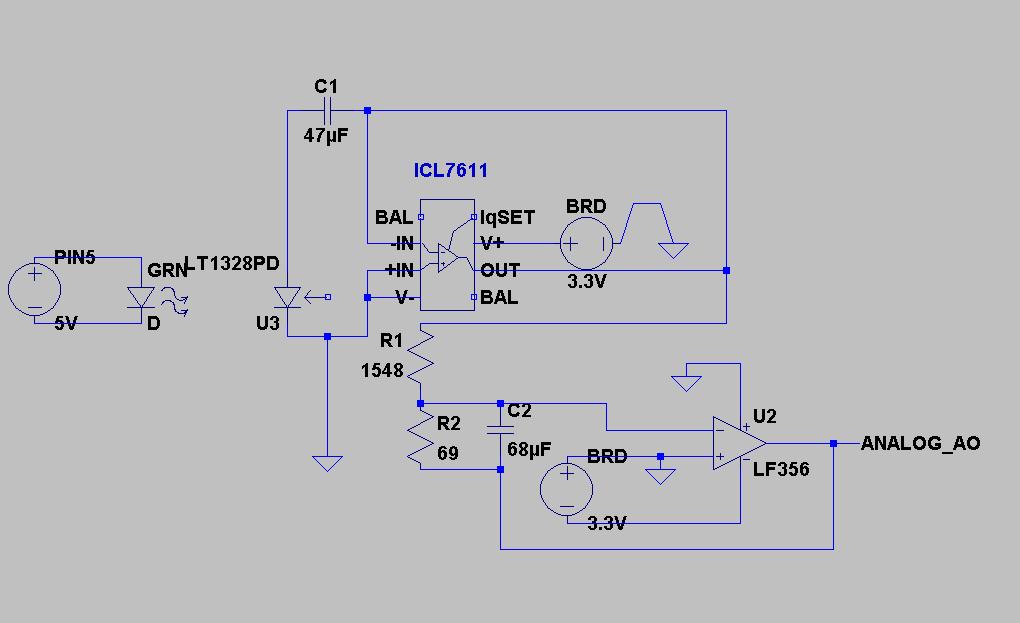
Arduino sampling code and circuit schematic
The code implementation discussed in the previous post has been initiated. To improve organization, the code has been modularized into functions, simplifying the overall structure. It is available along with the other code. Challenges were encountered in calculating averages while...

communication Multiplex data and LED pin
A chip conversion is being performed for the Sparkfun LED RingCoder. The sample code provided with the product functions effectively on an Arduino UNO, utilizing a separate pin for each input/output—specifically, five pins for the shift registers and six pins...

Pong Game Console
A simple game console was created to play Pong and other games using Atari 2600 joysticks. The Arduino processes joystick inputs and outputs the data to a TV using the TVout library. The project was designed to demonstrate that anyone...

Programming Arduino Wirelessly
The Arduino system provides a straightforward and open-source approach for programming microcontrollers. Typically, this involves using a serial or USB cable directly connected to the microcontroller project. However, challenges arise when the project is located in inaccessible areas, such as...

Arduino board
If you are interested in working with Arduino, you may have considered creating your own Arduino board.
Creating a custom Arduino board can be an enriching project that allows for greater flexibility and personalization in electronic designs. The process typically involves...

Modular Music Box Arduino polyphonic audio
Prior to emailing Pablo Gian Villamil, he provided a link to his class notes on generating polyphonic sound with Arduino. Efforts were made to understand his circuitry through various blog posts and component listings, including the CMOS Hex Schmitt Trigger...

Keyless Entry Arduino
If the number 8 is pressed, it will affect the wire ROW3 and COL2. This allows the microcontroller to determine which key was pressed using only 7 wires from the keypad.
The described circuit involves a matrix keypad configuration, which is...

ultrasound How do I drive an ultrasonic transducer with an Arduino
A cat deterrent system utilizing an Arduino, similar to existing models. Detection has been successfully implemented, and it has been determined that an ultrasonic transducer is required to generate the necessary deterrent sound.
The proposed cat deterrent system employs an Arduino...

Arduino Liquid Crystal Displays
A tutorial on LCD communication was planned for a later date due to high demand. A circuit was already assembled for testing a new LCD provided by element14. The tutorial explains how communication functions with modern LCD character displays, showcasing...