


Minimal PIC18 USB connection schematic

Description: During the process of organizing computer files, a schematic was discovered that was utilized in the initial phase of USB LED Matrix development. It is believed that this schematic could be beneficial to others.
The schematic in question pertains to a USB LED Matrix, a device that utilizes an array of light-emitting diodes (LEDs) to create visual displays controlled via a USB interface. The design typically includes a microcontroller to manage the LED operation, allowing for dynamic content display.
The matrix is usually constructed with a grid layout, where each LED is individually addressable. This enables the creation of various patterns and animations by controlling the intensity and color of each LED. The microcontroller is programmed to interpret data received through the USB connection, which may come from a computer or other USB-enabled device.
Power management is a critical aspect of the design, as the LED matrix must operate efficiently to prevent overheating and ensure longevity. A voltage regulator may be included to maintain a stable power supply to the LEDs and microcontroller. Additionally, current-limiting resistors are often employed to prevent excess current from damaging the LEDs.
The schematic may also incorporate various input/output (I/O) connections, allowing for the integration of additional features such as buttons for user interaction or sensors for environmental feedback. This versatility enhances the usability of the LED matrix in different applications, ranging from decorative displays to functional indicators.
Overall, the USB LED Matrix schematic serves as a foundational blueprint for those interested in developing their own LED display projects, offering insights into the necessary components and their interconnections.While cleaning up my computer files I stumbled over this schematic, which I used in the early stage of the USB LED Matrix development, and I thought it might be usefull to others.
The schematic in question pertains to a USB LED Matrix, a device that utilizes an array of light-emitting diodes (LEDs) to create visual displays controlled via a USB interface. The design typically includes a microcontroller to manage the LED operation, allowing for dynamic content display.
The matrix is usually constructed with a grid layout, where each LED is individually addressable. This enables the creation of various patterns and animations by controlling the intensity and color of each LED. The microcontroller is programmed to interpret data received through the USB connection, which may come from a computer or other USB-enabled device.
Power management is a critical aspect of the design, as the LED matrix must operate efficiently to prevent overheating and ensure longevity. A voltage regulator may be included to maintain a stable power supply to the LEDs and microcontroller. Additionally, current-limiting resistors are often employed to prevent excess current from damaging the LEDs.
The schematic may also incorporate various input/output (I/O) connections, allowing for the integration of additional features such as buttons for user interaction or sensors for environmental feedback. This versatility enhances the usability of the LED matrix in different applications, ranging from decorative displays to functional indicators.
Overall, the USB LED Matrix schematic serves as a foundational blueprint for those interested in developing their own LED display projects, offering insights into the necessary components and their interconnections.While cleaning up my computer files I stumbled over this schematic, which I used in the early stage of the USB LED Matrix development, and I thought it might be usefull to others.

typewriter
The device is capable of detecting input from a typewriter, enabling it to send and receive text to and from a computer via USB. It was specifically designed as a platform for playing interactive fiction games, particularly for custom software...

Automatic Switch Project
Model railroad turnouts, often referred to as switches, can be controlled in various ways. The simplest method is manual control, operated by hand. Remote activation is typically achieved through pneumatic (air) or electrical means. The project discussed in these articles...

lf286 Linux USB LCD display with watchdog and buttons
This article is the result of positive feedback on previous hardware articles. Readers of LinuxFocus expressed interest in interfacing with the USB bus. This solution utilizes the LCD display from a May 2002 article and connects it to the USB...

mbed usb breakout
One issue this creates is that the USB port previously used for communication with HyperTerminal is no longer available. An alternative solution is required, which led to the selection of the FT232RL chip. This choice was made primarily due to...

The Itsy-Bitsy USB Lamp
It connects to the USB port and is ideal for checking motherboard switches and jumper settings. Many users may recall a commercial product from a few years ago, the "Itty Bitty Book Light," which was designed to clip onto a...

Water Level controller
The microcontroller-based water level controller and motor protector manages the on and off states of the motor based on the water level in the overhead tank (OHT). It regulates the tank's water level through a microcontroller, thereby providing automatic protection...
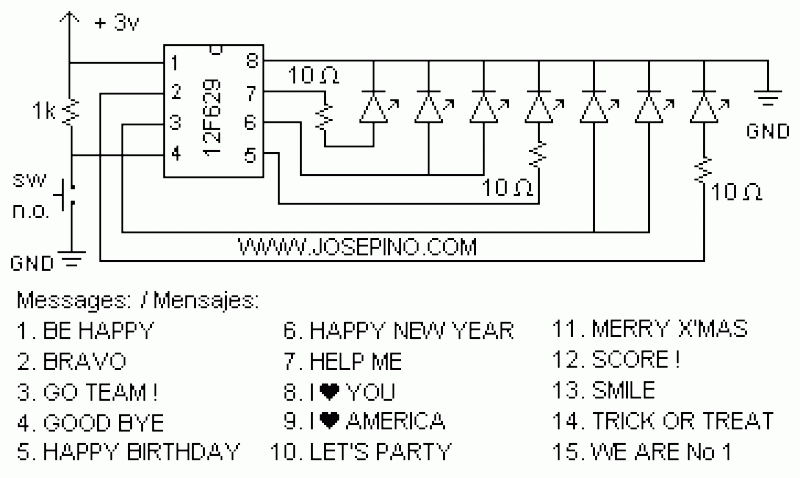
ON/OFF button using Microcontrollers
Using a switch to power up your microcontroller projects may not be a good idea if you need to "wake" the PIC during some events. For example: A metal detector sends a pulse indicating a car is ready to enter...

USB Printer Share Switch Circuit
This simple device enables two computers to share a single USB printer or other USB devices, such as an external flash drive, memory card reader, or scanner. A rotary switch is used to select the PC that will be connected...
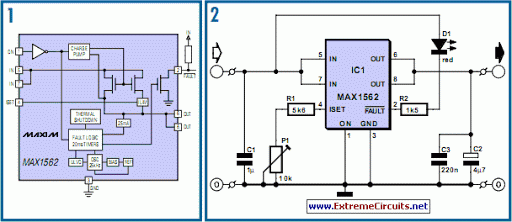
USB Fuse
Life in the 21st century would be almost unbearable without some of the computer peripherals that PC users now look upon as essentials, such as keyboards, mice, and printers.
Computer peripherals play a crucial role in enhancing the functionality and usability...