


Open Source USB Generic HID devices based on the PIC18F and Windows
#PIC18F
#USB
#HID
#Windows
#embedded systems
#firmware
#device driver
#programming
#electronics
#interface

Description: If you have experience with PIC18F microcontrollers and the USB Generic HID standard, you may have noticed the complexity involved in supporting USB on both the PIC18F and the Windows host side. Progressing beyond basic functionalities, such as reading a switch and flashing an LED, presents a significant challenge with a steep learning curve. To assist hobbyists interested in more advanced projects, a framework has been developed for creating USB devices, which encompasses both Windows host application development and PIC18F firmware. This framework includes a Visual Studio C# class library that manages the intricacies of Windows-specific SDKs and operating system requirements, a reference application that demonstrates the use of the class library and serves as a testing interface, a straightforward USB hardware reference design, and a PIC18F4550 firmware that communicates with the class library. This setup allows for rapid development and testing of USB devices and Windows host applications with minimal knowledge of the USB Generic HID protocol. The class library provides a simple interface for USB device interaction from C#, while the firmware serves as an example of the necessary software for the PIC in device design. The framework facilitates command and response exchanges between the USB device and the host, along with bi-directional bulk data transfers, enabling the development of complex data-capture applications that require swift information exchange. The latest version of the USB library and firmware incorporates several enhancements and bug fixes, including changes to the method for registering device event notifications, which is now managed by the library without needing a WndProc override in user code. The reference hardware can be easily assembled on a breadboard and is designed to match the pinout of the Microchip PIC DEM FS USB board, allowing for the purchase of a reference board if desired. The hardware features four LEDs to indicate the status of the USB device as it processes requests from the Windows host application. The board is designed to accommodate additional devices and circuitry as needed, with the only essential component being the USB port and its associated hardware. The reference hardware is configured for a bus-powered USB device, drawing power directly from the host computer, which simplifies the circuit but limits current consumption to 100mA. For devices requiring higher power for components such as relays, motors, or LED arrays, a self-powered configuration is necessary. The self-powered version of the reference board includes an LM7805 5V regulator to manage the DC input. The 5V input from the USB bus is routed to RA0 on the PIC18F4550, enabling the firmware to detect USB cable connections and disconnections, though this power-sense feature can be omitted if desired.
The framework enables developers to create sophisticated USB devices with ease, significantly reducing the complexity typically associated with USB communication. The Visual Studio C# class library abstracts the lower-level details of USB interaction, allowing developers to focus on application logic rather than protocol intricacies. The reference application serves as a practical demonstration, providing a user-friendly interface for testing and validating the USB device's functionality.
The hardware design is intentionally kept simple, allowing for easy assembly and modification. The inclusion of four status LEDs provides immediate visual feedback regarding the device's operational state, enhancing the user experience during development and debugging. The design's compatibility with existing Microchip boards offers flexibility for developers who may prefer to utilize commercial solutions or existing prototypes.
For projects requiring more power, the self-powered design offers a robust solution, accommodating higher current demands while maintaining the integrity of the USB communication. The addition of the LM7805 voltage regulator ensures stable operation, providing the necessary power management for various applications. This comprehensive approach to USB device development, encompassing both hardware and software elements, positions the framework as a valuable resource for hobbyists and professionals alike, facilitating the creation of innovative USB-enabled solutions.If you`ve dabbled with PIC18F microcontrollers and the USB Generic HID standard before (perhaps you`ve even tried my Building a PIC18F USB device project) then you will have noticed that there is a lot of complexity in supporting USB on both the PIC18F and the Windows host-side of things. Getting beyond the basic steps of reading a switch and flashing an LED (how many projects have you built to flash LEDs !) is actually quite a large task with a steep learning-curve. To make things easier on the hobbyist who wishes to delve into more exciting projects, I`ve developed a framework for producing USB devices which covers both the Windows host-side application development and the PIC18F firmware itself.
The framework consists of a Visual Studio C# class library (which handles all of the intricacy of dealing with the Windows specific SDKs and operating system requirements), a windows reference application (which demonstrates how to use the class library and acts as a testing front-end for the library), a simple USB hardware reference design and (last but not least!) a PIC18F4550 firmware which communicates with the class library. In essence this means that you can rapidly develop and test a USB device and the Windows host-application with a minimum of USB Generic HID protocol knowledge.
The class library gives you a very simple interface to the USB device from C# and the firmware serves as an example of how to create the specific software needed on the PIC for your device design. The framework includes the ability to pass commands and responses to and from the USB device as well as bi-directional bulk-transfer of data allowing you to build more complex data-capture applications which require more information to be passed quickly from host to device and vice-versa.
Version 3 of the USB library and firmware is now available (2011-10-16). I`ve made several major and minor enhancements to the library as well as some bug fixing. Here is a list of the enhancements and changes: Changed the method used for registering to receive device event notifications. This is now handled by the library and does not need a WndProc override in the user code The reference hardware is extremely simple and can be built on a breadboard if required.
I`ve made the pin-out of the hardware identical to the PIC DEM FS USB board available from Microchip to allow you to buy a reference board (if you want to!), you can also use my clone of the Microchip board - the PIC USB Development Board. If you don`t have the time/money/inclination to make a reference board here is a circuit schematic of the minimum required hardware for the reference board for both the PIC18F4550 and PIC18F2550 microcontrollers: The reference hardware provides 4 LEDs which are used to show the status of the USB device as it processes the various requests that can be sent to it from the Windows host-application.
The 4 LEDs (from left-to-right) mean: The board provides all you need to add in your own devices and circuity as you require, you can even remove the LEDs, the only part the firmware truly requires is the USB port and its associated hardware. The reference hardware shown above is for a bus-powered USB device (it takes its power directly from the host computer).
This requires the fewest parts and gives you a very simple circuit, however the current draw of the device is limited to 100mA. If you want to build devices that consume more power (to drive more hardware such as relays, motors, arrays of LEDs, etc.
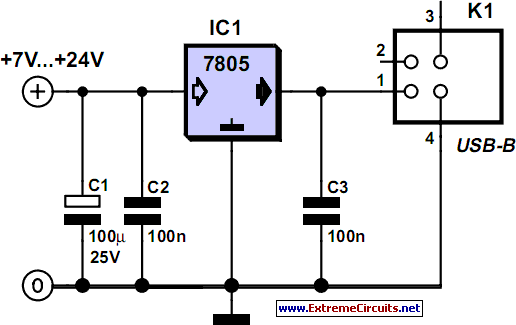
) you will need to make the device self-powered. The following circuit schematic shows a simple self-powered version of the reference board. A LM7805 5V regulator is added to regulate the DC input. The 5V input from the USB bus is directed to RA0 on the PIC18F4550 which allows the firmware to detect when the USB cable is connected and disconnected. You can omit this power-sense feature, however that means that your firmwar
The framework enables developers to create sophisticated USB devices with ease, significantly reducing the complexity typically associated with USB communication. The Visual Studio C# class library abstracts the lower-level details of USB interaction, allowing developers to focus on application logic rather than protocol intricacies. The reference application serves as a practical demonstration, providing a user-friendly interface for testing and validating the USB device's functionality.
The hardware design is intentionally kept simple, allowing for easy assembly and modification. The inclusion of four status LEDs provides immediate visual feedback regarding the device's operational state, enhancing the user experience during development and debugging. The design's compatibility with existing Microchip boards offers flexibility for developers who may prefer to utilize commercial solutions or existing prototypes.
For projects requiring more power, the self-powered design offers a robust solution, accommodating higher current demands while maintaining the integrity of the USB communication. The addition of the LM7805 voltage regulator ensures stable operation, providing the necessary power management for various applications. This comprehensive approach to USB device development, encompassing both hardware and software elements, positions the framework as a valuable resource for hobbyists and professionals alike, facilitating the creation of innovative USB-enabled solutions.If you`ve dabbled with PIC18F microcontrollers and the USB Generic HID standard before (perhaps you`ve even tried my Building a PIC18F USB device project) then you will have noticed that there is a lot of complexity in supporting USB on both the PIC18F and the Windows host-side of things. Getting beyond the basic steps of reading a switch and flashing an LED (how many projects have you built to flash LEDs !) is actually quite a large task with a steep learning-curve. To make things easier on the hobbyist who wishes to delve into more exciting projects, I`ve developed a framework for producing USB devices which covers both the Windows host-side application development and the PIC18F firmware itself.
The framework consists of a Visual Studio C# class library (which handles all of the intricacy of dealing with the Windows specific SDKs and operating system requirements), a windows reference application (which demonstrates how to use the class library and acts as a testing front-end for the library), a simple USB hardware reference design and (last but not least!) a PIC18F4550 firmware which communicates with the class library. In essence this means that you can rapidly develop and test a USB device and the Windows host-application with a minimum of USB Generic HID protocol knowledge.
The class library gives you a very simple interface to the USB device from C# and the firmware serves as an example of how to create the specific software needed on the PIC for your device design. The framework includes the ability to pass commands and responses to and from the USB device as well as bi-directional bulk-transfer of data allowing you to build more complex data-capture applications which require more information to be passed quickly from host to device and vice-versa.
Version 3 of the USB library and firmware is now available (2011-10-16). I`ve made several major and minor enhancements to the library as well as some bug fixing. Here is a list of the enhancements and changes: Changed the method used for registering to receive device event notifications. This is now handled by the library and does not need a WndProc override in the user code The reference hardware is extremely simple and can be built on a breadboard if required.
I`ve made the pin-out of the hardware identical to the PIC DEM FS USB board available from Microchip to allow you to buy a reference board (if you want to!), you can also use my clone of the Microchip board - the PIC USB Development Board. If you don`t have the time/money/inclination to make a reference board here is a circuit schematic of the minimum required hardware for the reference board for both the PIC18F4550 and PIC18F2550 microcontrollers: The reference hardware provides 4 LEDs which are used to show the status of the USB device as it processes the various requests that can be sent to it from the Windows host-application.
The 4 LEDs (from left-to-right) mean: The board provides all you need to add in your own devices and circuity as you require, you can even remove the LEDs, the only part the firmware truly requires is the USB port and its associated hardware. The reference hardware shown above is for a bus-powered USB device (it takes its power directly from the host computer).
This requires the fewest parts and gives you a very simple circuit, however the current draw of the device is limited to 100mA. If you want to build devices that consume more power (to drive more hardware such as relays, motors, arrays of LEDs, etc.
) you will need to make the device self-powered. The following circuit schematic shows a simple self-powered version of the reference board. A LM7805 5V regulator is added to regulate the DC input. The 5V input from the USB bus is directed to RA0 on the PIC18F4550 which allows the firmware to detect when the USB cable is connected and disconnected. You can omit this power-sense feature, however that means that your firmwar

usb power socket with indicator
Nearly all modern computers are equipped with logic blocks that facilitate the implementation of a USB port. A USB port can deliver over 100 mA of continuous current at 5V to peripherals connected to the bus. Therefore, it serves effectively...

USB Digital Setting Circles
The serial version of the DSC circuit described in these pages is easily adaptable for use with a USB-serial conversion cable. FTDI manufactures the TTL-232R-5V cable, which converts TTL-level serial data directly from the PIC to USB for connection to...

USB Cellphone Charger circuit
A mobile phone can be charged using the USB outlet of a PC. This simple USB cellphone charger circuit provides a regulated output of 4.7 volts for charging the mobile phone. The USB outlet typically supplies 5 volts DC and...
Power Supply For USB Devices
An increasing number of devices are being sold that operate on internal rechargeable batteries. While a compatible charger is typically included in the packaging, there are a...
Rechargeable battery systems have become prevalent in various electronic devices, necessitating the development of...

USBStickLogger - USB thumb drive logger for serial data - fischl.de
The default setting for the UART is 9600 baud, with 1 start bit, 1 stop bit, and no parity. This parameter can be configured by placing the file "CONFIG.TXT" onto the USB thumb drive. Currently, only the baud rate can...

USB08 HC908JB8 USB Reference Design
The primary target audience of the USB08 Reference Design consists of developers focused on microcontroller firmware and hardware, as well as those dealing with Windows driver and application software issues. USB (Universal Serial Bus) serves as a standardized bus interface...

UsbProg-SHARP
This project is a variant of the UsbProg project developed by Benedikt Sauter. The schematics, board layout, and firmware have been released as an open-source project. Modifications include the option to place a jumper across JP3 pins 2 and 3,...

usb to rs232 converter using ft232
Some still remember the serial RS232 port, also referred to as a COM PORT, as its functionality has largely been replaced by USB ports. However, for electronics engineering students and technicians learning about computer interfaces, the RS232 port remains relevant....

USB Single Cell Charger
Lithium Polymer Batteries are a very common source of power today. Many electronics gadgets have one inside, and they have some reasonable features. I've bought great batteries, with different sizes and capacities for my electronics projects. So long I'm using...