


BBC Micro Model B and a plume of acrid smoke
#BBC Micro
#vintage computer
#power failure
#acrid smoke
#hardware issue
#retro computing
#computer repair
#electrical fault

Description: After the recent post about The Demon Machine, experimentation with the BBC Micro Model B was initiated. Upon powering it up, the familiar two-tone boot sound was heard. However, about 15 minutes later, a fizzing and popping noise emanated from the computer, prompting an immediate power cut. Unfortunately, it was too late, and a volume of blue/grey acrid smoke escaped from the left side of the machine near the power supply. The power was cut, and the machine was moved to a safe distance from flammable materials while waiting for the smoke to dissipate. After the smoke cleared, the decision was made to power the machine back on, though such actions are not recommended due to the presence of high voltages and electrolytic capacitors that can pose hazards. Safety glasses were worn during this process. Upon inspection, no visible burn marks were found on the power supply, and the machine functioned correctly. A detailed examination revealed that one of the capacitors used for power supply filtering had cracked open and burnt out, with visible cracking on its casing and electrolyte leaking onto the circuit board. Research indicated that this type of failure is common in the BBC Micro power supply and is easily repairable. Notably, the capacitor is rated by safety agencies due to the risk of failure leading to a short circuit at mains potential, and it features a metallized film designed to self-heal or fail safely. The capacitor is tested by applying rated voltage through a transformer and filter while introducing random transients across it. The dead capacitor identified is C1, positioned directly across the mains power input, indicating that soldering repairs will be necessary once the replacement part is obtained.
The BBC Micro Model B is a classic 8-bit home computer that utilizes a power supply system incorporating electrolytic capacitors for voltage stabilization and filtering. In this scenario, the failure of capacitor C1, which is integral to the mains input circuitry, has led to a hazardous situation characterized by smoke emission and potential risk of electrical shock. The capacitor's role is critical as it smooths out voltage fluctuations, ensuring the reliability of the power supply.
When a capacitor fails, particularly in older electronic devices, it can lead to various symptoms including overheating, reduced performance, or complete failure of the unit. The failure mode of the capacitor observed in this case is indicative of internal breakdown, often precipitated by age, excessive voltage, or manufacturing defects. The design of safety-rated capacitors includes features to minimize risks associated with failure, such as self-healing capabilities and the ability to withstand high peak voltages without igniting.
For the repair process, the following steps are recommended: First, ensure that the device is completely powered down and disconnected from any power source. Next, the faulty capacitor (C1) should be desoldered from the circuit board, taking care to avoid damage to surrounding components. A replacement capacitor with equivalent specifications, particularly in terms of voltage rating and capacitance, should be sourced. It is advisable to use components that are also safety-rated to maintain the integrity of the power supply. Once the new capacitor is in place, thorough testing should be conducted to ensure that the power supply functions correctly and safely before reconnecting the device for regular use. This incident serves as a reminder of the importance of routine maintenance and periodic inspection of older electronic equipment to prevent similar failures and ensure continued operation.So, after yesterday`s post about The Demon Machine I decided it would be fun to play around with the BBC Micro Model B and so I plugged it in and powered up. The familiar two-tone boot sound played and the machine was on. About 15 minutes after power up there was a fizzing, popping sound from the computer and I ran to cut the power.
Too late! A pl ume of blue/grey acrid smoke poured out of the left hand side of the machine right by the power supply. I cut the power and moved the machine away from anything that might burn quickly and waited for the smoke to stop.
It quickly dispersed and so I did the only thing a self respecting software engineer would do. I decided to turn it back on again. Warning. I don`t recommend that you do this sort of thing yourself. There are high voltages there, plus a bunch of electrolytic capacitors that can do nasty things if they feel like it. I was doing this while wearing my safety glasses. You`ll notice that there doesn`t seem to be anything burnt in the supply and when I powered on the machine worked perfectly.
Close examination shows that one of the capacitors used for power supply filtering had cracked open and burnt up. If you look carefully you can see the cracking on the case of the capacitor and fresh capacitor juice running across the circuit board (most visible on the top photograph).
A quick Google tells me that this is one of the most common failures on the BBC Micro power supply and easily repaired. It`s interesting to note that the capacitor used is rated by safety agencies because of the potential for failure leading to a short at mains potential and the metallized film is designed to self heal or fail safely.
The device is also meant to fail safely at a peak potential of 2. 5kV without burning with a flame. The capacitor under test is connected to rated voltage through a transformer and filter. 20 transients are then introduced across the capacitor at random intervals while rated voltage remains applied. The amplitude of the transient is dependent on the class of capacitor. The capacitor may not flame during this test. The dead capacitor is C1 which sits right across the mains power input. Looks like I`ll be getting the soldering iron out once the replacement part arrives.
The BBC Micro Model B is a classic 8-bit home computer that utilizes a power supply system incorporating electrolytic capacitors for voltage stabilization and filtering. In this scenario, the failure of capacitor C1, which is integral to the mains input circuitry, has led to a hazardous situation characterized by smoke emission and potential risk of electrical shock. The capacitor's role is critical as it smooths out voltage fluctuations, ensuring the reliability of the power supply.
When a capacitor fails, particularly in older electronic devices, it can lead to various symptoms including overheating, reduced performance, or complete failure of the unit. The failure mode of the capacitor observed in this case is indicative of internal breakdown, often precipitated by age, excessive voltage, or manufacturing defects. The design of safety-rated capacitors includes features to minimize risks associated with failure, such as self-healing capabilities and the ability to withstand high peak voltages without igniting.
For the repair process, the following steps are recommended: First, ensure that the device is completely powered down and disconnected from any power source. Next, the faulty capacitor (C1) should be desoldered from the circuit board, taking care to avoid damage to surrounding components. A replacement capacitor with equivalent specifications, particularly in terms of voltage rating and capacitance, should be sourced. It is advisable to use components that are also safety-rated to maintain the integrity of the power supply. Once the new capacitor is in place, thorough testing should be conducted to ensure that the power supply functions correctly and safely before reconnecting the device for regular use. This incident serves as a reminder of the importance of routine maintenance and periodic inspection of older electronic equipment to prevent similar failures and ensure continued operation.So, after yesterday`s post about The Demon Machine I decided it would be fun to play around with the BBC Micro Model B and so I plugged it in and powered up. The familiar two-tone boot sound played and the machine was on. About 15 minutes after power up there was a fizzing, popping sound from the computer and I ran to cut the power.
Too late! A pl ume of blue/grey acrid smoke poured out of the left hand side of the machine right by the power supply. I cut the power and moved the machine away from anything that might burn quickly and waited for the smoke to stop.
It quickly dispersed and so I did the only thing a self respecting software engineer would do. I decided to turn it back on again. Warning. I don`t recommend that you do this sort of thing yourself. There are high voltages there, plus a bunch of electrolytic capacitors that can do nasty things if they feel like it. I was doing this while wearing my safety glasses. You`ll notice that there doesn`t seem to be anything burnt in the supply and when I powered on the machine worked perfectly.
Close examination shows that one of the capacitors used for power supply filtering had cracked open and burnt up. If you look carefully you can see the cracking on the case of the capacitor and fresh capacitor juice running across the circuit board (most visible on the top photograph).
A quick Google tells me that this is one of the most common failures on the BBC Micro power supply and easily repaired. It`s interesting to note that the capacitor used is rated by safety agencies because of the potential for failure leading to a short at mains potential and the metallized film is designed to self heal or fail safely.
The device is also meant to fail safely at a peak potential of 2. 5kV without burning with a flame. The capacitor under test is connected to rated voltage through a transformer and filter. 20 transients are then introduced across the capacitor at random intervals while rated voltage remains applied. The amplitude of the transient is dependent on the class of capacitor. The capacitor may not flame during this test. The dead capacitor is C1 which sits right across the mains power input. Looks like I`ll be getting the soldering iron out once the replacement part arrives.

Multi power failure alarm circuit
The circuit functions as an AC blown fuse alarm. When the fuse (BX) is intact, 220 V AC voltage passes through a bridge rectifier composed of diodes VD1 to VD4. Resistor R1 limits the current, and the output is converted...

Power failure alarm
In the event of a power failure, the radio alarm activates without producing a loud siren, bell, or whistle. The alarm remains active even after power is restored and will continue until the RESET button is pressed.
The described circuit functions...

Power failure detector
This circuit indicates that a power outage occurred for 1, 10, 100, and 500 seconds based on the values provided for R* and C*. After a power failure, the circuit can be reset by pressing the Reset button.
The described circuit...

power failure alarm circuit
A 12-volt relay is connected between two stages such that when it receives 12 volts from the supply, it activates and disconnects the 3-volt DC supply from the melody circuit. Conversely, when mains power is absent, the relay switches off...

Power Resumption Alarm circuit
This is a simple power resumption alarm circuit that can be installed within the switch box. It emits beeping sounds when power is restored following a power failure.
The power resumption alarm circuit is designed to provide an audible alert upon...
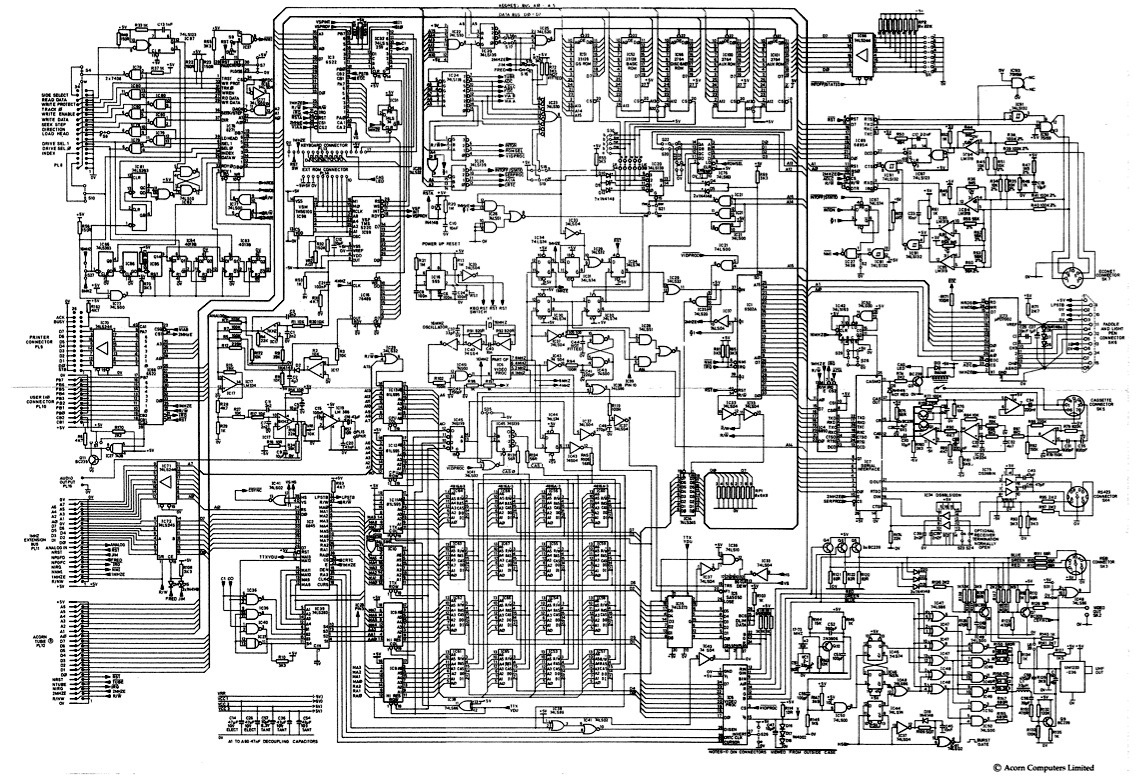
bbc micro model b
Before the Atom was launched, executives at the BBC's education programming department, inspired by ITV's 1979 series The Mighty Micro, devised a plan to encourage the general public in Britain to learn about computer technology. The Mighty Micro, hosted by...

Power Failure Alarm Project
Construct a basic power failure alarm monitoring system utilizing an AC relay that activates a buzzer when the mains power supply is interrupted.
The proposed power failure alarm monitoring system is designed to provide an audible alert during a loss of...

Power-faiwre-alarm
When the power is turned off, the alarm activates when switch S1 is closed. The 12-V battery remains charged when the circuit is connected and the switch is in the "on" position.
The described circuit features an alarm system that operates...
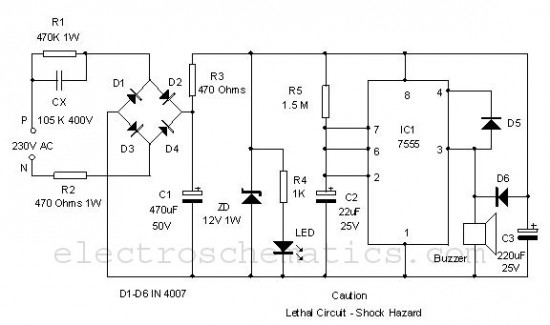
Power Resumption Alarm circuit
This is a simple power resumption alarm circuit that can be installed within the switch box. It emits beeping sounds when power is restored following a power outage.
The power resumption alarm circuit serves as a practical solution for alerting users...