


Nonvolatile STANDBY/ON Switch
#nonvolatile
#STANDBY/ON switch
#industrial
#telecom
#state memory
#power management
#toggle switch
#circuit memory

Description: The STANDBY/ON switch is suitable for applications such as industrial and telecom, where the circuitry needs to retain its state (either STANDBY or ON).
The STANDBY/ON switch circuit is designed to maintain the operational state of the system, ensuring that it can resume its previous condition after a power interruption. This functionality is critical in environments where equipment must not lose its operational status, such as in industrial automation or telecommunications.
The circuit typically employs a latching mechanism, which can be implemented using various components such as flip-flops, relays, or solid-state devices. A common approach is to use a bistable multivibrator, which allows the switch to toggle between two stable states. When the switch is activated, it triggers the multivibrator to change its state, thus powering the device ON. Conversely, when the switch is pressed again, the multivibrator changes state to STANDBY, effectively cutting off power while retaining the last operational status.
In practical applications, the circuit may also include additional features such as LED indicators to show the current state, and debounce circuitry to prevent false triggering from mechanical switch bounce. The design may incorporate a power supply with a backup capacitor to ensure that the state is preserved even during brief power outages. It is essential to consider the current and voltage ratings of all components to ensure reliable operation in the intended application environment.
Overall, the STANDBY/ON switch circuit serves a vital role in maintaining system integrity and operational continuity in critical applications.STANDBY/ON switch below is appropriate for applications (industrial and telecom, for example) in which the circuitry must remember its state (STANDBY or ON).
The STANDBY/ON switch circuit is designed to maintain the operational state of the system, ensuring that it can resume its previous condition after a power interruption. This functionality is critical in environments where equipment must not lose its operational status, such as in industrial automation or telecommunications.
The circuit typically employs a latching mechanism, which can be implemented using various components such as flip-flops, relays, or solid-state devices. A common approach is to use a bistable multivibrator, which allows the switch to toggle between two stable states. When the switch is activated, it triggers the multivibrator to change its state, thus powering the device ON. Conversely, when the switch is pressed again, the multivibrator changes state to STANDBY, effectively cutting off power while retaining the last operational status.
In practical applications, the circuit may also include additional features such as LED indicators to show the current state, and debounce circuitry to prevent false triggering from mechanical switch bounce. The design may incorporate a power supply with a backup capacitor to ensure that the state is preserved even during brief power outages. It is essential to consider the current and voltage ratings of all components to ensure reliable operation in the intended application environment.
Overall, the STANDBY/ON switch circuit serves a vital role in maintaining system integrity and operational continuity in critical applications.STANDBY/ON switch below is appropriate for applications (industrial and telecom, for example) in which the circuitry must remember its state (STANDBY or ON).

Toggle Switch Control Of Twin Coil Switch Machines
These circuits allow an ON-ON type DPDT toggle switch to control a twin coil switch machine motor. The handle of the switch can then be used to indicate the route selected. The circuits are also able to control LEDs that...

Power Path Management Battery Charger
Powering the system is required by many applications while charging the battery simultaneously. Interaction between the system and charger may result in a...
Power management in electronic systems is critical, particularly in applications that necessitate simultaneous operation and battery charging. This...

smart amp delay
This system is designed as a Windows service that detects various power events, including Suspend, Hibernate, Reboot, and Shutdown. It can send appropriate responses to a control circuit, specifically a Heartbeat or Kill signal. The trigger mechanism is also regulated...

Mains Manager
It is common to forget to turn off peripherals such as monitors, scanners, and printers when shutting down a PC. Typically, these devices are connected to a four-way trailing socket, which is plugged into a wall outlet. If this outlet...

electronic toggle switch no1
This circuit activates and deactivates a relay with the press of a button. Any momentary push-to-make switch can be utilized. Pressing the button once will activate the relay, while pressing it again will deactivate the relay. The circuit is designed...
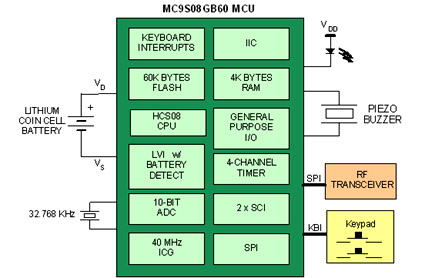
How to extend the battery life of your microcontroller based design
Battery-powered devices, such as electric toothbrushes, shavers, cell phones, PDAs, MP3 players, and remote controls, are integral to daily life. Consequently, power management has become a critical consideration for embedded designers. Microcontrollers (MCUs) provide various methods for managing power requirements...
Power Path Management Battery Charger
Powering the system is required by many applications while charging the battery simultaneously. Interaction between the system and charger may result in a...
Power management in electronic systems is critical, particularly in applications that necessitate simultaneous operation and battery charging. This...

Control a processor`s power supply in real time
In battery-powered applications in which power management is key, a microprocessor may adjust its core voltage corresponding to an increase or a decrease in clock speed, allowing full processing power when necessary but not wasting excess power when idle. The...

Electronic Toggle Switch No1 circuit
This simple circuit will energize and de-energize a relay with the push of a button. Pressing the button once will energize the relay, while pressing it a second time will de-energize the relay. The accompanying circuit provides a solid introduction...