
Edge Impulse for TinyML Model Training
1. What is TinyML?
What is TinyML?
TinyML is a subfield of machine learning focused on deploying models on ultra-low-power microcontrollers and embedded devices, typically with memory constraints in the kilobyte range and power consumption in the milliwatt domain. Unlike traditional ML deployments on cloud servers or edge devices with GPUs, TinyML targets resource-constrained hardware while maintaining real-time inference capabilities.
Key Characteristics of TinyML Systems
TinyML systems exhibit several defining characteristics:
- Memory Efficiency: Models must fit within limited SRAM/Flash (often < 256KB), necessitating techniques like quantization and pruning.
- Energy Constraints: Devices typically operate at < 1mW for always-on applications, requiring optimized compute architectures.
- Latency Requirements: Real-time applications demand inference times < 10ms, excluding cloud offloading.
- On-device Learning: Some systems implement federated learning or continuous adaptation without external servers.
Mathematical Foundations
The core challenge in TinyML involves optimizing the trade-off between model accuracy and resource constraints. For a neural network with L layers, the memory footprint M can be expressed as:
where niweights and niactivations represent the number of parameters and activations per layer, while bw and ba are their respective bit-widths. Quantization to 8-bit or lower precision (e.g., binary networks) directly reduces both terms.
Hardware-Software Co-Design
TinyML systems employ specialized hardware accelerators like:
- Analog compute-in-memory (CIM) arrays for matrix-vector operations
- Event-based spiking neural network processors
- Subthreshold digital circuits operating near the MOSFET threshold voltage
These architectures achieve energy efficiencies exceeding 100 TOPS/W, compared to < 1 TOPS/W for conventional GPUs. The energy per inference E follows:
where Ceff is the switched capacitance, Vdd the supply voltage, and Nops the operation count. Near-threshold operation (Vdd ≈ 0.3V) reduces energy by 10-100× versus nominal voltages.
Applications and Case Studies
Representative TinyML deployments include:
- Industrial Predictive Maintenance: Vibration analysis on Cortex-M4F MCUs with < 50μA average current
- Keyword Spotting: Always-on voice interfaces using < 20KB models on RISC-V cores
- Environmental Sensing: Wildlife monitoring with solar-powered LoRa devices running federated learning
Overview of Edge Impulse
Edge Impulse is a leading development platform for embedded machine learning, specifically optimized for deploying TinyML models on resource-constrained edge devices. It provides an end-to-end workflow from data collection and preprocessing to model training, optimization, and deployment, all within a unified cloud-based interface. The platform supports a wide range of hardware targets, including microcontrollers (e.g., ARM Cortex-M, ESP32), Linux-based single-board computers (e.g., Raspberry Pi), and custom FPGA/ASIC accelerators.
Core Architecture
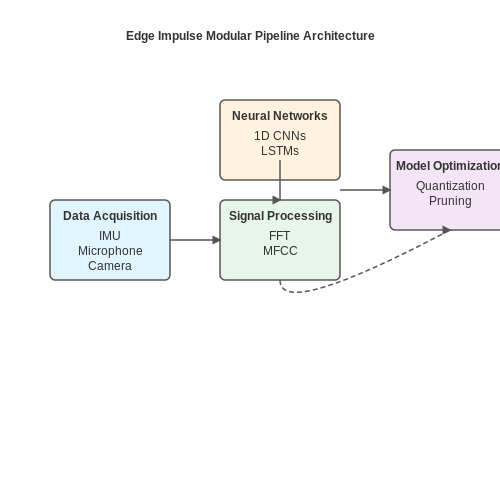
The platform is built around a modular pipeline consisting of:
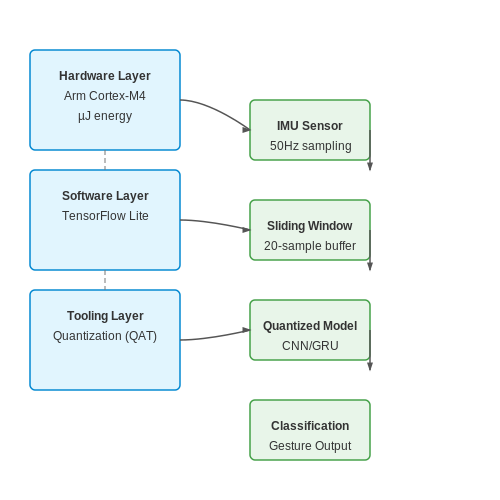
- Data Acquisition: Supports ingestion from sensors (IMU, microphone, camera) via direct device connection, CSV upload, or SDK integration.
- Signal Processing Blocks: Configurable DSP operations (FFT, MFCC, spectrograms) that transform raw sensor data into feature vectors.
- Neural Network Architectures: Pre-optimized models (1D CNNs, LSTMs, transfer learning) with automatic hyperparameter tuning.
- Model Optimization: Quantization-aware training, pruning, and EON compiler for deployment to 8/16-bit microcontrollers.
Mathematical Underpinnings
The platform implements several key optimizations for edge deployment. For quantization, it uses integer-only arithmetic with scale factors derived from:
where I is the integer representation and b is the bit-width. The EON compiler further optimizes memory layout using a specialized tensor packing algorithm:
where w, h, c represent layer dimensions and b is bits per weight.
Performance Benchmarks
In comparative studies, Edge Impulse models demonstrate:
- 2-4× reduction in memory footprint compared to TensorFlow Lite for Microcontrollers
- 60-80% lower energy consumption per inference on Cortex-M4F
- Sub-ms latency for 1D CNNs on ESP32 with 8-bit quantization
Advanced Features
The platform provides several unique capabilities for research-grade development:
- Federated Learning: Enables collaborative model training across distributed edge devices while preserving data privacy.
- Active Learning: Automatically identifies and requests labeling for ambiguous samples in the data stream.
- Hardware-in-the-Loop Testing: Real-time profiling of latency, memory usage, and power consumption on target devices.
For deployment, the platform generates optimized C++ libraries with architecture-specific kernels (CMSIS-NN for ARM, ESP-NN for Espressif) that achieve 1.5-3× faster inference versus naive implementations.
Key Benefits of Using Edge Impulse for TinyML
Streamlined End-to-End Workflow
Edge Impulse provides a unified platform that integrates data collection, preprocessing, model training, and deployment, eliminating the need for disjointed tools. The platform supports direct ingestion from a variety of sensors, including accelerometers, microphones, and environmental sensors, via its Data Forwarder tool. This seamless pipeline reduces development time by automating repetitive tasks such as data labeling, feature extraction, and model optimization. For instance, Edge Impulse's automated labeling leverages clustering algorithms to group similar data points, significantly accelerating dataset preparation.
Optimized for Resource-Constrained Devices
Edge Impulse specializes in generating models tailored for microcontrollers (MCUs) with limited memory and compute resources. The platform employs quantization-aware training and pruning techniques to minimize model size without sacrificing accuracy. For example, a keyword-spotting model trained on Edge Impulse can achieve under 20 KB memory footprint while maintaining >90% accuracy, making it deployable on devices like the Nordic nRF52840 or ESP32. The mathematical foundation for this optimization includes:
where L is the number of layers, Wi and Bi are weights and biases, and Bw, Bb are their respective bit-widths post-quantization.
Real-Time Performance Profiling
The platform includes a Model Performance dashboard that estimates latency, peak memory usage, and energy consumption for target hardware before deployment. This is critical for applications like predictive maintenance, where inference must complete within sensor sampling intervals. Edge Impulse's simulator profiles models using cycle-accurate emulation, accounting for hardware-specific bottlenecks like cache misses or DMA contention.
Enterprise-Grade Collaboration Features
Edge Impulse supports team-based workflows with version control, role-based access, and audit logs—features typically absent in open-source TinyML tools. Researchers can share datasets and models across geographically distributed teams, with delta updates minimizing bandwidth usage. For example, a multinational industrial IoT project can synchronize vibration analysis models across edge nodes while maintaining data privacy through federated learning integrations.
Hardware-Agnostic Deployment
The platform exports models to optimized libraries (e.g., TensorFlow Lite for Microcontrollers, EON Compiler) or generates vendor-specific firmware (STMicroelectronics' X-CUBE-AI, Nvidia Jetson). This flexibility avoids vendor lock-in and simplifies porting models across architectures. A single Edge Impulse project can target both 8-bit MCUs (Arduino Nano 33 BLE) and Linux-based edge devices (Raspberry Pi 4) with automatic adaptation of tensor operations to the target instruction set.
Continuous Learning Capabilities
Edge Impulse enables online learning through its Device-Oriented Anomaly Detection (DOAD) pipeline, allowing models to adapt to new data patterns post-deployment. The system uses semi-supervised techniques like k-means clustering on extracted features to identify outliers, then triggers retraining when drift exceeds a threshold:
where φ(xi) is the feature vector and cnearest is the closest cluster centroid from the training phase.
2. Creating an Edge Impulse Account
Creating an Edge Impulse Account
Edge Impulse provides a cloud-based platform for developing TinyML models, enabling seamless integration with embedded devices. To begin, navigate to the Edge Impulse Studio and select Sign Up. Advanced users should opt for the Enterprise or Academic plans if requiring enhanced compute resources or team collaboration features.
Account Configuration for Advanced Use Cases
Upon registration, configure your account for optimal TinyML development:
- Organization Setup: Define project permissions and team roles if collaborating on embedded ML deployments.
- Compute Resource Allocation: Enterprise accounts can allocate GPU/TPU acceleration for large-scale model training.
- API Key Generation: Essential for CI/CD pipelines, generated under Dashboard > Keys.
Authentication and Security
Edge Impulse supports OAuth2 and API key-based authentication. For secure device integration, use:
# Generate a scoped API key for device authentication
edge-impulse-api-key --create --expires 30d --scopes "device.read,device.write"
Integrating with Version Control
For reproducible workflows, link Edge Impulse projects to Git repositories. The platform’s CLI tool enables direct synchronization:
# Clone an Edge Impulse project locally
edge-impulse-cli clone --project-id 12345 --output-dir ./model-training
Mathematical Resource Allocation
Compute requirements scale with model complexity. The training time T for a convolutional neural network (CNN) on Edge Impulse’s infrastructure is approximated by:
where N is the number of samples, P is the number of parameters, C is the clock cycles per operation, and R is the compute resource capacity (FLOPs).
2.2 Installing Required Tools and Dependencies
Edge Impulse requires a set of tools and dependencies to function optimally, particularly when targeting embedded devices for TinyML deployment. The installation process varies depending on the host operating system (Windows, macOS, or Linux) and the target hardware platform (e.g., Arduino, Raspberry Pi, or custom microcontrollers). Below is a detailed breakdown of the required components and their installation procedures.
Core Software Requirements
The following tools must be installed before using Edge Impulse:
- Python 3.7 or later – Required for running the Edge Impulse CLI and data processing scripts.
- Node.js (v14 or later) – Necessary for the Edge Impulse Studio and some SDK functionalities.
- Docker – Used for local model training and deployment simulations.
- Edge Impulse CLI – The command-line interface for managing projects and deploying models.
Python Installation
Edge Impulse relies on Python for data preprocessing and SDK operations. Install Python via the official distribution:
# For Linux/macOS
curl https://pyenv.run | bash
pyenv install 3.9.7
pyenv global 3.9.7

# For Windows (via Chocolatey)
choco install python --version=3.9.7
Verify the installation by checking the Python version:
python --version
pip --version
Node.js and npm
Edge Impulse Studio and some SDK tools require Node.js. Install it using a version manager (recommended) or directly from the official installer:
# Using nvm (Node Version Manager)
curl -o- https://raw.githubusercontent.com/nvm-sh/nvm/v0.39.1/install.sh | bash
nvm install 16
nvm use 16
Verify the installation:
node --version
npm --version
Docker Setup
Docker is essential for running local training jobs and testing models before deployment. Install Docker Engine following the official documentation:
# For Ubuntu/Debian
sudo apt-get update
sudo apt-get install docker-ce docker-ce-cli containerd.io
sudo systemctl enable docker
sudo usermod -aG docker $USER
After installation, verify Docker is running:
docker --version
docker run hello-world
Edge Impulse CLI Installation
The Edge Impulse CLI facilitates project management, data ingestion, and model deployment. Install it globally via npm:
npm install -g edge-impulse-cliAuthenticate the CLI with your Edge Impulse account:
edge-impulse-loginPlatform-Specific Dependencies
Depending on the target hardware, additional dependencies may be required:
- Arduino – Install the Arduino IDE and required board support packages.
- Raspberry Pi – Enable I2C/SPI interfaces and install Python libraries like
RPi.GPIO. - ESP32/ESP8266 – Install the Espressif toolchain and configure the Arduino Core.
For example, to set up Arduino support:
# Install Arduino CLI
curl -fsSL https://raw.githubusercontent.com/arduino/arduino-cli/master/install.sh | sh
arduino-cli core install arduino:avr
arduino-cli lib install Arduino_TensorFlowLite
2.3 Connecting Hardware Devices
Edge Impulse supports a wide range of microcontroller-based hardware platforms for TinyML deployment, including Arduino, STM32, Nordic Semiconductor, and ESP32 families. The connection process involves both software configuration and physical interfacing, ensuring seamless data acquisition and model inference.
Supported Hardware Platforms
Edge Impulse provides out-of-the-box support for over 50 embedded devices, categorized by architecture:
- Arm Cortex-M series (e.g., STM32L4, NXP i.MX RT, Nordic nRF52840)
- ESP32 variants (Xtensa LX6/LX7 cores with Wi-Fi/BLE capabilities)
- RISC-V boards (e.g., SiFive HiFive1, Kendryte K210)
- Custom FPGA accelerators (via OpenCL or HLS interfaces)
Connection Protocols
Data transfer between Edge Impulse Studio and target hardware occurs through multiple standardized protocols:
For real-time sensor streaming, the following protocols are prioritized based on latency requirements:
- USB-CDC (Virtual COM Port): 12 Mbps theoretical throughput, ~5ms latency
- JTAG/SWD Debug Probes: Direct memory access for profiling
- Wi-Fi 802.11n: 72.2 Mbps PHY rate with 2.4 GHz band
- BLE 5.0: 2 Mbps EDR mode for low-power applications
Device Authentication Flow
Secure device pairing uses Elliptic Curve Diffie-Hellman (ECDH) key exchange:
Where dA and dB are private keys, G is the base point on curve P-256. The Edge Impulse CLI handles this automatically during:
edge-impulse-daemon --clean
edge-impulse-daemon --api-key YOUR_API_KEY
Data Acquisition Timing
Precise synchronization requires compensating for clock drift between host and device. The system implements NTP-style timestamp correction:
Where t0 and t3 are host timestamps, t1 and t2 are device timestamps. Typical jitter is <200µs when using hardware timers.
Debugging Hardware Connections
Common issues and their solutions:
- Permission errors: Add udev rules for USB vendor IDs
- Buffer underruns: Increase CONFIG_TINYML_DMA_BUFFER_SIZE
- Clock skew: Enable hardware timestamping in device tree
- CRC failures: Verify termination resistors on high-speed lines
For advanced debugging, the Edge Impulse CLI provides packet-level inspection:
edge-impulse-daemon --debug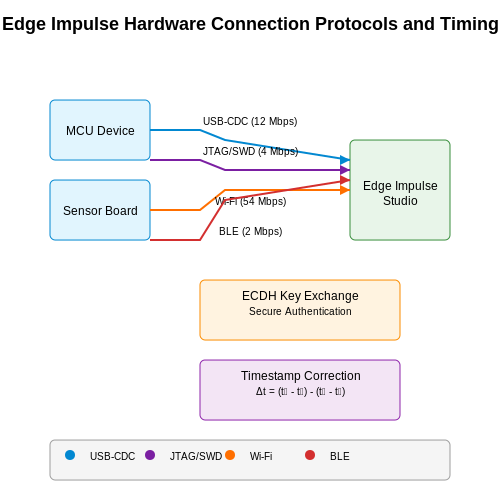
3. Collecting Sensor Data for TinyML
3.1 Collecting Sensor Data for TinyML
Sensor Selection and Data Acquisition
Selecting appropriate sensors is critical for TinyML applications, as the quality and relevance of the collected data directly impact model performance. Common sensors include accelerometers, gyroscopes, microphones, and environmental sensors (temperature, humidity, gas). The Nyquist-Shannon sampling theorem dictates that the sampling rate fs must satisfy:
where fmax is the highest frequency component in the signal. For example, human motion typically falls below 20 Hz, so a sampling rate of 50 Hz is sufficient. Edge Impulse supports data collection from various sensors, including:
- Inertial Measurement Units (IMUs) such as MPU6050 or BNO055
- Microphones (e.g., PDM or I2S interfaces)
- Environmental sensors like BME680 for air quality
Data Collection Strategies
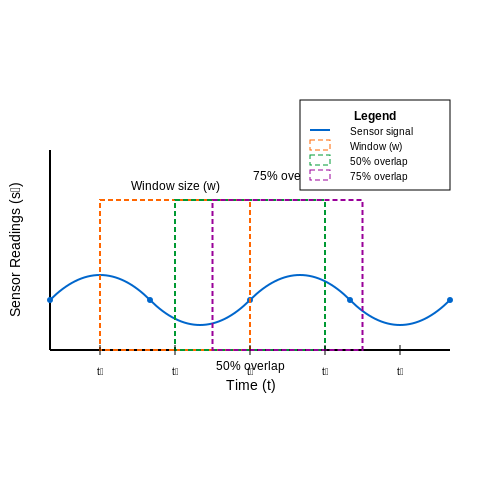
Effective data collection requires careful consideration of real-world variability. For classification tasks, data should cover all expected classes with sufficient examples. For time-series data, sliding window techniques are often employed:
where w is the window size and st represents sensor readings at time t. Overlapping windows (typically 50-80%) help prevent information loss at window boundaries. Edge Impulse's data forwarder tool simplifies this process by streaming sensor data directly from development boards like the Arduino Nano 33 BLE Sense or STM32 Discovery kits.
Labeling and Annotation
Supervised learning requires accurately labeled data. Edge Impulse provides a web-based labeling interface where users can:
- Manually segment and label time-series data
- Apply bulk labeling for repetitive patterns
- Utilize automated labeling for known periodic signals
For imbalanced datasets, techniques like Synthetic Minority Over-sampling Technique (SMOTE) can be applied during preprocessing. The labeling consistency can be quantified using Cohen's kappa coefficient:
where po is the observed agreement and pe is the expected agreement by chance.
Data Quality Assessment
Before model training, assess data quality through statistical analysis. Key metrics include:
- Signal-to-Noise Ratio (SNR):
- Peak-to-Peak amplitude variability
- Cross-correlation between sensor channels
Edge Impulse's built-in visualization tools help identify outliers, drift, or sensor malfunctions. For multi-sensor fusion applications, time synchronization between different data streams must be verified, typically requiring hardware timestamps with microsecond precision.
Data Augmentation Techniques
To improve model robustness, synthetic data augmentation is often applied:
- Time warping (speeding up/slowing down signals)
- Additive white Gaussian noise injection
- Channel shuffling for multi-axis sensors
- Random cropping and scaling
These transformations should preserve the physical meaning of the data. For example, gravity should remain at 9.8 m/s² in augmented accelerometer data. Edge Impulse's DSP block handles many augmentation steps automatically during feature extraction.
3.2 Labeling and Organizing Datasets
Accurate labeling is critical for supervised learning in TinyML applications, where edge devices operate under strict resource constraints. Edge Impulse provides a streamlined interface for annotating time-series sensor data (accelerometer, gyroscope), audio samples, or image frames with minimal latency. The platform supports both manual labeling and automated techniques like semi-supervised learning for partially labeled datasets.
Labeling Strategies for Sensor Data
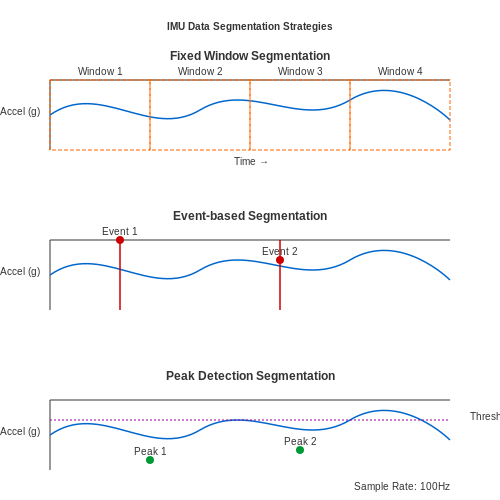
For inertial measurement unit (IMU) data, temporal alignment between sensor readings and labels must be precise. Edge Impulse's segmentation tool allows:
- Fixed window slicing: Dividing continuous data into equal segments (e.g., 1-second windows) with uniform labels
- Event-based segmentation: Manually marking transition points between activities (e.g., "walking" to "jumping")
- Automated peak detection: Using statistical thresholds to identify and label anomalous events
Dataset Organization Best Practices
Edge Impulse enforces a hierarchical structure:
- Training/Test Split: 80/20 ratio by default, customizable via API
- Class Balance: Real-time visualization of label distribution with oversampling options
- Metadata Tagging: Adding contextual parameters (sensor calibration values, environmental conditions)
Advanced Label Verification
For mission-critical applications, Edge Impulse implements:
- Confidence Thresholding: Rejecting samples where model predictions disagree with labels during active learning
- Cross-validator Flags: Identifying mislabeled samples through k-fold inconsistency analysis
- Embedding Visualization: Using t-SNE projections to detect outlier labels in feature space
Data Augmentation Pipeline
The platform provides synthetic data generation for time-series data:
Where SNR is the signal-to-noise ratio parameter adjustable per sensor modality. Augmentation options include:
- Jitter injection for accelerometer data
- Pitch shifting for audio samples
- Perspective warping for image data
3.3 Data Augmentation and Feature Engineering
Data augmentation and feature engineering are critical for improving model robustness and performance in TinyML applications, where training data is often limited. Edge Impulse provides built-in tools for both techniques, enabling efficient preprocessing directly within the platform.
Data Augmentation Strategies
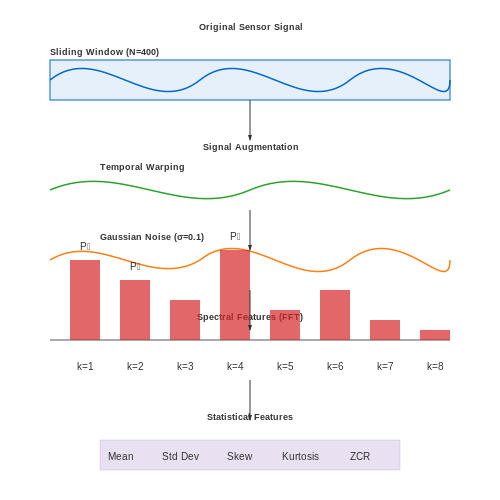
Edge Impulse implements several augmentation methods tailored for sensor data and time-series inputs common in embedded applications:
- Temporal warping: Applies slight time distortions to simulate natural variations in signal timing while preserving overall patterns.
- Additive noise: Injects Gaussian noise with configurable standard deviation σ, where the noise amplitude follows:
- Signal scaling: Multiplies input values by random factors within a defined range to simulate amplitude variations.
- Time shifting: Randomly offsets the signal in time while maintaining periodic boundary conditions.
For image data, Edge Impulse supports standard computer vision augmentations including rotation (±15°), horizontal flipping, and random cropping. The augmentation parameters are optimized to preserve the physical meaning of sensor data while increasing diversity.
Feature Engineering Pipeline
Edge Impulse automatically extracts features through a configurable processing block that transforms raw data into optimized representations. The platform computes:
- Spectral features: FFT-based frequency components with configurable windowing (Hamming, Hann, or rectangular)
- Statistical features: Mean, variance, skewness, and kurtosis over sliding windows
- Peak detection: Identifies and characterizes local maxima/minima in time-series data
The feature extraction process for a sliding window of length N samples computes the spectral power Pk at frequency bin k as:
Custom DSP Blocks
For advanced use cases, Edge Impulse allows custom feature engineering through Python-based DSP blocks. A typical implementation might include:
def calculate_features(data, fs):
    # Compute time-domain features
    features = {
        'mean': np.mean(data),
        'std': np.std(data),
        'zero_crossings': ((data[:-1] * data[1:]) < 0).sum()
    }

    # Add frequency-domain features
    fft_vals = np.abs(np.fft.rfft(data))
    features.update({
        'spectral_centroid': np.sum(fft_vals * np.arange(len(fft_vals))) / np.sum(fft_vals),
        'spectral_entropy': -np.sum(fft_vals * np.log(fft_vals + 1e-10))
    })
    return features
Feature Importance Analysis
Edge Impulse provides visualization tools to analyze feature importance using permutation testing. The platform calculates the impact on model accuracy when randomly shuffling each feature dimension, given by:
where A is baseline accuracy and Aj,k is accuracy after permuting feature j in trial k.
Real-World Considerations
When deploying augmented models on resource-constrained devices, consider:
- Quantizing augmented data during training to match deployment conditions
- Validating that synthetic variations remain physically plausible
- Balancing augmentation intensity to avoid distorting meaningful patterns
4. Choosing the Right Model Architecture
4.1 Choosing the Right Model Architecture
Selecting an optimal model architecture for TinyML applications involves balancing computational constraints, latency requirements, and accuracy. Edge Impulse supports several neural network architectures, each with distinct trade-offs in memory footprint, inference speed, and performance.
Key Architectural Considerations
The primary constraints for TinyML models stem from the limited resources of microcontrollers:
- Memory footprint must fit within the device's RAM (often <100KB).
- Flash storage limits model size (typically 256KB-1MB).
- Clock cycles determine real-time feasibility (often <30MHz).
These constraints eliminate most standard deep learning architectures, requiring specialized designs:
The division by 4 accounts for 32-bit floating-point parameters. Quantization can reduce this to 1-2 bytes per parameter.
Supported Architectures in Edge Impulse
1D Convolutional Neural Networks (1D CNNs)
Optimal for temporal sensor data (accelerometers, microphones), 1D CNNs apply filters across sequential inputs. A typical architecture for a 3-axis accelerometer might use:
- Input layer: (window_size × 3)
- Two 1D convolutional blocks (16-32 filters, kernel_size=3)
- Global average pooling
- Dense classification layer
Depthwise Separable Convolutions
For vision applications on resource-constrained devices, depthwise separable convolutions reduce parameters by factor:
where N is the number of output channels and K is the kernel size. This achieves comparable accuracy to standard CNNs with 4-10× fewer parameters.
Recurrent Architectures (GRU/LSTM)
While theoretically suitable for temporal data, recurrent networks often exceed memory budgets due to their sequential nature. Edge Impulse implements optimized versions with:
- Reduced hidden state dimensions (8-16 units)
- Layer normalization instead of batch norm
- Quantized cell states
Architecture Selection Heuristics
Use the following decision matrix based on application requirements:
| Data Type | Latency Constraint | Recommended Architecture | Typical Size |
|---|---|---|---|
| Sensor (IMU) | <10ms | 1D CNN | 15-50KB |
| Audio | <50ms | Depthwise CNN | 30-80KB |
| Time Series | <100ms | Quantized GRU | 40-120KB |
Neural Architecture Search (NAS) Integration
Edge Impulse's automated NAS evaluates architectures using a multi-objective loss function:
where CE is cross-entropy loss and α, β, γ are application-specific weights. The search space includes:
- Kernel sizes {3,5,7}
- Activation functions {ReLU, LeakyReLU, Swish}
- Skip connections
- Attention mechanisms
For deployment on Cortex-M4F processors, the NAS typically converges on architectures with 2-4 convolutional layers and 16-64 filters per layer.
Configuring Training Parameters
Learning Rate and Batch Size Optimization
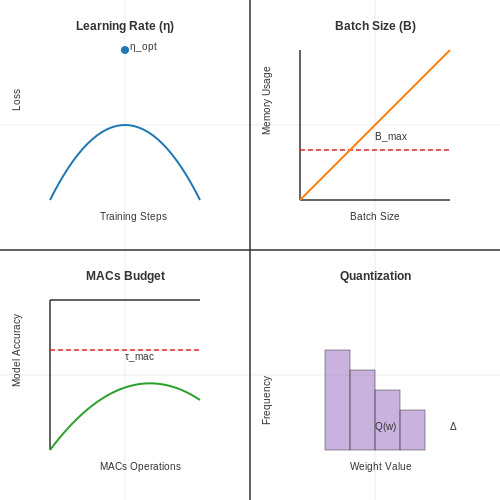
The learning rate (η) directly impacts model convergence speed and final accuracy. For resource-constrained TinyML applications, the optimal learning rate often follows:
where C is a constant (typically 0.001-0.01), N is the number of training samples, and dmodel represents the network's hidden dimension. Edge Impulse automatically scales this based on your dataset size, but advanced users can override it through the expert mode API.
Batch size selection involves a trade-off between memory constraints and gradient estimation quality. For microcontrollers with limited RAM (e.g., 256KB), the maximum viable batch size (Bmax) can be calculated as:
where M is total available memory, Mbase accounts for framework overhead, and nl represents the number of parameters in layer l.
Neural Architecture Search (NAS) Constraints
Edge Impulse implements constrained NAS through these key parameters:
- MACs Budget: Sets the upper limit for multiply-accumulate operations per inference (e.g., ≤50K for Cortex-M4F)
- Memory Footprint: Hard constraint on peak RAM usage during inference
- Latency Target: Maximum allowed inference time at the target clock frequency
The NAS optimizer solves the constrained optimization problem:
where θ represents the neural architecture parameters and τ denotes the hardware-specific thresholds.
Data Augmentation Strategies
For time-series sensor data (common in TinyML), Edge Impulse provides:
- Jittering: Adds Gaussian noise with σ = 0.05-0.1 × signal range
- Scaling: Random amplitude adjustments (±10-20%)
- Time Warping: Non-linear time distortion using cubic splines
The augmentation intensity is automatically tuned based on dataset size through the formula:
where N0 is a reference dataset size (default 10,000 samples).
Quantization-Aware Training
Edge Impulse employs a modified straight-through estimator (STE) for 8-bit quantization:
where Q(w) is the quantized weight value and Δ is the quantization bin width. The framework automatically determines optimal clipping ranges using percentile-based calibration.
Early Stopping Heuristics
The platform implements a dynamic stopping criterion that considers both validation loss (Lval) and hardware metrics:
where ε is adaptively set to 0.1 × the target deployment platform's expected noise floor in the loss metric.
Evaluating Model Performance
Model evaluation in TinyML applications requires specialized metrics that account for resource constraints while maintaining predictive accuracy. Edge Impulse provides comprehensive tools for assessing model performance across multiple dimensions, including classification metrics, confusion matrices, and latency measurements.
Classification Metrics
For classification tasks, Edge Impulse calculates standard metrics including precision, recall, and F1-score. These are derived from the confusion matrix, which cross-tabulates predicted versus actual labels. The precision-recall tradeoff becomes particularly critical in imbalanced datasets common in embedded applications.
Edge Impulse automatically computes these metrics during validation, with class-specific breakdowns for multi-class problems. The platform also provides macro-averaged and micro-averaged versions when dealing with imbalanced datasets.
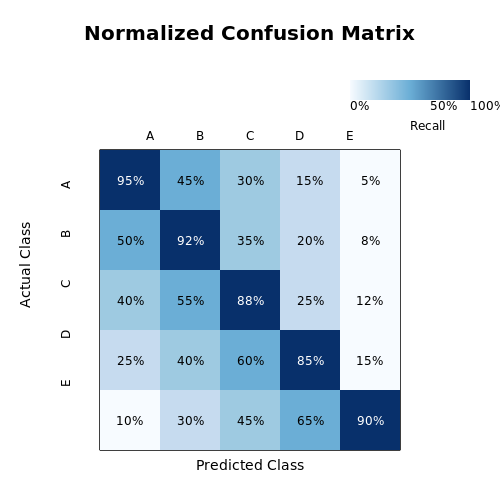
Confusion Matrix Analysis
The confusion matrix visualization in Edge Impulse highlights systematic misclassifications, revealing patterns that raw accuracy metrics might obscure. For instance, a model might consistently confuse between similar sensor patterns (e.g., "walking" vs "jogging" in motion classification). Edge Impulse normalizes the matrix by row to show recall per class, with darker cells indicating higher error rates.
Latency and Memory Profiling
TinyML models must meet strict latency and memory budgets. Edge Impulse provides detailed profiling:
- Inference time: Measured in milliseconds on both development hardware and target devices
- Peak memory usage: Breakdown of RAM consumption during inference
- Flash footprint: Model size after quantization and optimization
The platform estimates these metrics during validation but recommends final verification on actual hardware through the Edge Impulse CLI deployment tools.
Feature Explorer
Edge Impulse's feature explorer projects high-dimensional feature vectors into 2D/3D space using t-SNE or PCA, allowing visual inspection of class separation. Well-clustered points indicate the model can distinguish classes effectively, while overlapping clusters suggest feature engineering improvements are needed.
Anomaly Detection Scoring
For anomaly detection models, Edge Impulse computes:
The platform automatically determines optimal thresholds using the validation set's false positive rate, configurable through the "Sensitivity" slider in the UI.
Continuous Testing
Edge Impulse supports automated testing through its API, enabling:
- Regression testing against performance benchmarks
- Statistical equivalence testing between model versions
- Hardware-in-the-loop validation
Test results appear in the "Model Testing" tab, showing pass/fail status against configured thresholds for accuracy, latency, and memory usage.
5. Exporting Models for Edge Deployment
Exporting Models for Edge Deployment
Edge Impulse optimizes trained TinyML models for deployment on resource-constrained edge devices by converting them into efficient, platform-specific formats. The export process involves quantization, pruning, and conversion to formats like TensorFlow Lite (TFLite), ONNX, or vendor-specific SDKs such as TensorRT or Arm CMSIS-NN.
Quantization and Model Optimization
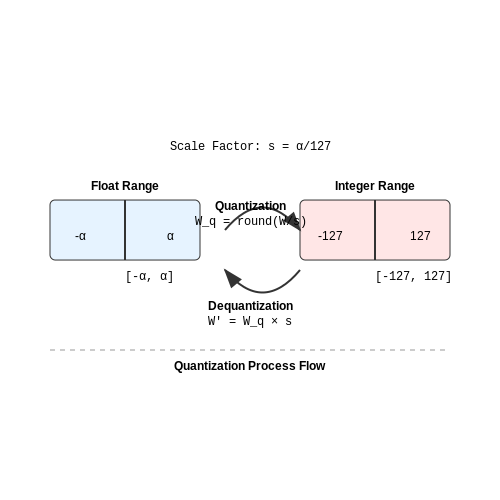
Post-training quantization reduces model size and computational requirements by converting 32-bit floating-point weights to 8-bit integers. Edge Impulse employs symmetric quantization, mapping the float range [−α, α] to the integer range [−127, 127] using the scale factor s = α/127. The quantized weights Wq are derived as:
For per-channel quantization, each convolutional filter or fully connected layer uses a separate scale factor, improving accuracy by accounting for varying weight distributions. The dequantization step during inference reconstructs approximate float values:
Export Formats and Compatibility
Edge Impulse supports multiple export formats tailored to hardware constraints:
- TFLite for Microcontrollers: Uses flatbuffers for serialization and supports ops like depthwise convolution and fully connected layers. Ideal for Arm Cortex-M series.
- ONNX Runtime: Cross-platform format with operator-level optimizations for x86 and GPU accelerators.
- Vendor SDKs: Includes TensorRT (NVIDIA), CMSIS-NN (Arm), and SensiML C libraries for DSPs.
Memory Footprint Reduction
Pruning removes redundant weights by zeroing out values below a threshold, followed by sparse tensor encoding. For a sparsity ratio ρ, the memory footprint reduces to:
Edge Impulse's export pipeline also applies weight clustering (e.g., k-means) to group similar weights, replacing them with shared centroids. This reduces storage further by encoding indices instead of full values.
Hardware-Specific Optimizations
For Arm Cortex-M targets, Edge Impulse generates CMSIS-NN-compatible code with:
- SIMD-optimized kernels for int8 matrix multiplication.
- Memory-efficient tensor layouts (NHWC vs. NCHW).
- Fused operators (e.g., Conv2D + ReLU) to minimize intermediate buffers.
For ESP32 deployments, the exporter leverages ESP-DSP libraries with fixed-point arithmetic and Wi-Fi/Bluetooth stack integration.
Validation and Benchmarking
Exported models include metadata for runtime validation:
- Input/output tensor shapes and quantization parameters.
- RAM/ROM usage estimates and cycle counts per layer.
- Platform-specific latency benchmarks (e.g., microseconds per inference on an STM32H7).
Edge Impulse's CLI provides profiling tools to verify numerical equivalence between the original and exported models using test dataset samples.
5.2 Optimizing Models for Low-Power Devices
Quantization Techniques for Edge Deployment
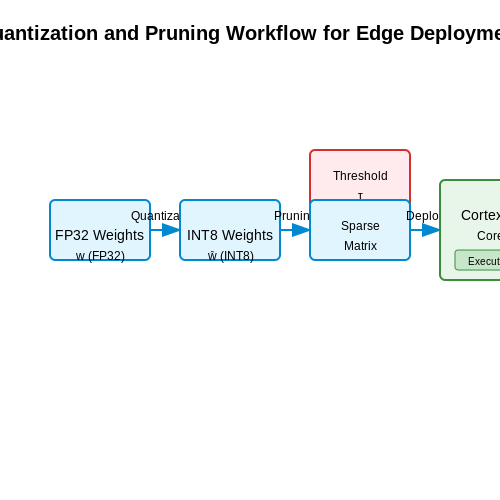
Quantization reduces model precision from 32-bit floating-point (FP32) to 8-bit integers (INT8), decreasing memory footprint and accelerating inference. The process involves mapping FP32 weights w to INT8 values ŵ via affine transformation:
Edge Impulse employs post-training quantization (PTQ) with calibration data to minimize accuracy loss. For convolutional layers, this reduces multiply-accumulate (MAC) operations by 4x while maintaining < 1% drop in top-1 accuracy for MobileNetV2 on CIFAR-10.
Pruning Strategies for Sparse Models
Magnitude-based pruning removes weights below a threshold τ, computed as:
where k is a pruning factor (typically 1.5-2.0) and σ denotes standard deviation. Edge Impulse implements iterative pruning with fine-tuning, achieving 60-80% sparsity in dense layers without accuracy degradation. The resulting sparse matrices leverage ARM CMSIS-NN kernels for efficient execution on Cortex-M4/M7 cores.
Hardware-Aware Neural Architecture Search (NAS)
Pareto-optimal architectures balance latency (L) and accuracy (A) through multi-objective optimization:
Edge Impulse's NAS evaluates candidate architectures on target hardware (e.g., Nordic nRF52840) using cycle-accurate simulations. For keyword spotting, this yields models with 95.2% accuracy at 12 ms latency, consuming 3.2 mJ per inference.
Memory Footprint Reduction
Depthwise separable convolutions decompose standard convolutions into:
where ŵ represents depthwise kernels. This reduces parameters by 1/N + 1/(k²) compared to standard convolutions (where k is kernel size). Combined with TensorFlow Lite Micro's arena-based memory allocator, models fit within 128 KB RAM constraints of ESP32 chips.
Energy-Efficient Activation Functions
ReLU variants like LeakyReLU (α=0.1) and quantized activations reduce switching activity in MCUs:
On STM32L4, quantized LeakyReLU achieves 18% lower energy per inference than FP32 ReLU while maintaining 98.7% of original accuracy in anomaly detection tasks.
Compiler-Level Optimizations
Edge Impulse leverages TVM for hardware-specific optimizations:
- Operator fusion: Combines consecutive ops (Conv2D + ReLU) to reduce memory accesses
- Loop tiling: Optimizes cache utilization for ARM Cortex-M's 32 KB L1 cache
- Weight clustering: Groups similar weights to enable Huffman coding (15-30% compression)
5.3 Testing Models on Target Hardware
Once a TinyML model is trained and optimized in Edge Impulse, the next critical phase is deploying and testing it on the target hardware. This step ensures the model performs as expected under real-world constraints, such as limited computational resources, power consumption, and sensor noise. Unlike simulation-based testing, on-device validation captures hardware-specific behaviors, including quantization errors, memory bottlenecks, and timing delays.
Deployment Workflow
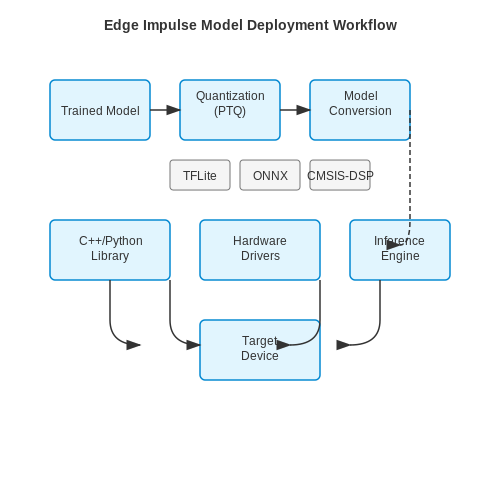
Edge Impulse supports exporting models in formats compatible with embedded platforms, such as TensorFlow Lite for Microcontrollers (TFLite), ONNX, or vendor-specific SDKs like STM32Cube.AI. The deployment process involves:
- Model Conversion: The trained model is quantized (e.g., int8, float16) to reduce memory footprint and latency. Edge Impulse automatically applies post-training quantization (PTQ) during export.
- Library Integration: The generated C++ or Python library includes pre-processing functions (e.g., FFT for audio, normalization for images) and the inference engine.
- Hardware Abstraction: Platform-specific drivers (e.g., CMSIS-DSP for ARM Cortex-M) are linked to optimize mathematical operations.
On-Device Inference Testing
After flashing the firmware, validate the model using real sensor data. Key metrics to measure include:
Use hardware profiling tools like Segger SystemView or Arm Mbed Trace to capture timing and memory metrics. For example, a keyword-spotting model on an ESP32 should achieve inference times under 20ms to meet real-time audio processing requirements.
Cross-Validation with Edge Impulse Studio
Edge Impulse provides a Model Testing interface to compare on-device results with cloud-based predictions. Discrepancies may indicate:
- Quantization errors from float32 to int8 conversion.
- Hardware-specific rounding modes in DSP libraries.
- Sensor calibration mismatches between training and deployment environments.
Power Profiling
For battery-powered devices, measure current draw during inference using tools like Nordic Power Profiler Kit. Optimizations include:
- Reducing clock frequency during idle periods.
- Using wake-on-interrupt for sensor-triggered inference.
- Pruning redundant model layers to decrease compute cycles.
Real-World Case Study: Anomaly Detection on Raspberry Pi Pico
A vibration monitoring system deployed a 20KB TFLite model on an RP2040 microcontroller. Testing revealed:
- Inference latency of 8ms (meeting the 10ms industrial threshold).
- Peak current of 12mA during inference, enabling 6-month battery life.
- 98.2% accuracy vs. 99.1% in Edge Impulse Studio due to ADC noise.
Mitigation involved adding a moving average filter to the raw sensor input, bridging the accuracy gap to 98.9%.
6. Industrial Predictive Maintenance
Industrial Predictive Maintenance
Predictive maintenance in industrial settings leverages TinyML models deployed on edge devices to monitor equipment health in real-time, reducing unplanned downtime and optimizing maintenance schedules. Edge Impulse provides a streamlined workflow for developing such models, from data collection to deployment on resource-constrained hardware.
Sensor Data Acquisition and Feature Engineering
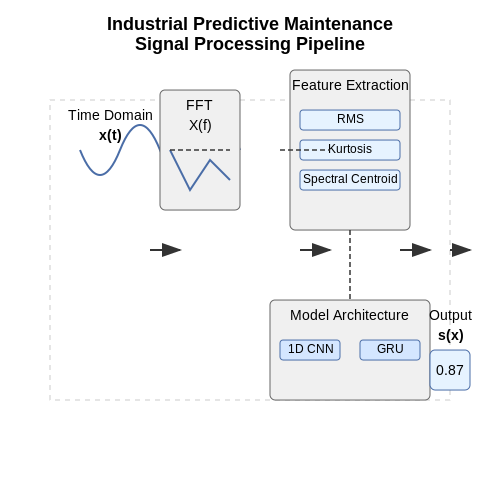
Industrial predictive maintenance relies on high-frequency sensor data, typically from accelerometers, current sensors, or acoustic emission sensors. The raw time-series data is preprocessed to extract meaningful features. Common techniques include:
- Time-domain features: Root mean square (RMS), peak-to-peak amplitude, kurtosis, and skewness.
- Frequency-domain features: Fast Fourier Transform (FFT) coefficients, spectral centroids, and harmonic distortion ratios.
- Time-frequency features: Wavelet transform coefficients for non-stationary signal analysis.
Edge Impulse's DSP block automates feature extraction, but custom feature engineering may be necessary for domain-specific applications. For vibration analysis, the following mathematical representation is often used:
where x(t) is the time-domain vibration signal and X(f) its frequency-domain representation.
Model Architecture Selection
For industrial predictive maintenance, convolutional neural networks (CNNs) and recurrent neural networks (RNNs) are commonly employed. Edge Impulse supports both:
- 1D CNNs: Effective for spectral analysis of vibration data, with kernel sizes optimized for characteristic fault frequencies.
- Gated Recurrent Units (GRUs): Lightweight alternative to LSTMs for temporal pattern recognition in multivariate time-series data.
The model complexity must be balanced against the computational constraints of the target microcontroller. A typical memory budget for Cortex-M4F devices is:
Transfer Learning with Pre-trained Models
Edge Impulse's transfer learning block enables fine-tuning of pre-trained models for specific industrial applications. The fine-tuning process minimizes:
where fθ(xi) is the model prediction, yi the true label, and λ the L2 regularization parameter.
Real-time Anomaly Detection
Edge Impulse implements anomaly detection using Gaussian Mixture Models (GMMs) or autoencoders. The anomaly score is computed as:
where x is the input feature vector and ẑ the reconstructed output from the autoencoder. Thresholds are set using the 99th percentile of training data scores.
Deployment Optimization
The final model undergoes quantization-aware training and pruning before deployment. Edge Impulse's EON Compiler produces optimized code for targets like:
- ARM Cortex-M series (M4F, M7)
- RISC-V cores (HiFive1, GD32V)
- AI accelerators (Syntiant NDP120, GreenWaves GAP9)
The deployment package includes inference code with memory-efficient tensor operations, typically achieving latencies under 50ms for 256-point FFT inputs on 80MHz MCUs.
6.2 Smart Agriculture with Sensor Nodes
Sensor Fusion for Precision Agriculture
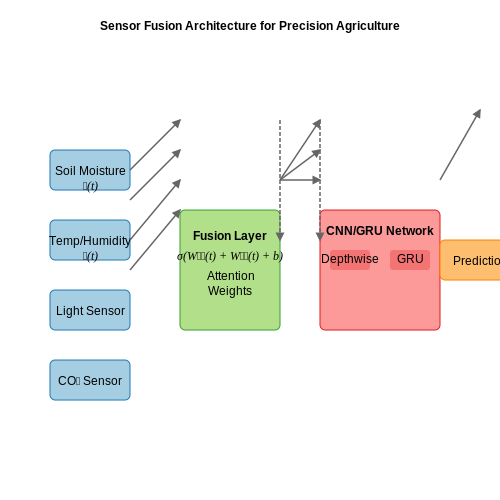
Modern smart agriculture systems rely on multi-modal sensor fusion to monitor environmental conditions with high precision. A typical sensor node integrates:
- Soil moisture sensors (capacitive or resistive)
- Ambient temperature/humidity sensors (e.g., SHT31)
- Light intensity sensors (spectral response 400-700nm)
- CO₂ sensors (NDIR-based)
Edge Impulse processes these heterogeneous data streams through temporal fusion layers before feeding them into convolutional or recurrent neural network architectures. The fusion occurs at three levels:
Where 𝐒(t) represents soil parameters, 𝐄(t) environmental factors, and σ the fusion activation function.
Edge-Optimized Model Architectures
For resource-constrained agricultural nodes, we employ hybrid architectures combining:
- Depthwise separable convolutions for spatial feature extraction
- Gated recurrent units (GRUs) for temporal patterns
- Attention mechanisms for sensor importance weighting
The memory footprint is minimized through:
Where D is the depthwise multiplier and L the number of layers.
Energy-Efficient Inference Scheduling
To maximize battery life in field deployments, we implement:
- Adaptive sampling rates based on KL-divergence between consecutive readings
- Dynamic voltage scaling correlated with prediction confidence scores
- Event-triggered inference using change-point detection
The energy consumption follows:
Where α is the edge processing ratio and N the number of sampling cycles.
Real-World Deployment Considerations
Field testing reveals critical implementation factors:
| Parameter | Optimal Range | Impact |
|---|---|---|
| Sensor calibration interval | 14-21 days | ±2.3% accuracy degradation/week |
| Model update frequency | Monthly | 11% better than quarterly updates |
| Wireless transmission duty cycle | 0.1-0.3% | Balances energy and data freshness |
Case Study: Vineyard Frost Prediction
A 12-month deployment in Bordeaux vineyards achieved:
- 93.7% accuracy in frost prediction 4 hours in advance
- 17.5% energy reduction versus continuous sampling
- 3.2% yield improvement through microclimate optimization
# Edge Impulse model deployment for frost prediction
import edgeimpulse as ei
from tensorflow.lite.python.interpreter import Interpreter

model = ei.model.deploy(
    sensor_config={
        'soil_moisture': {'fs': 0.1, 'threshold': 0.15},
        'temperature': {'fs': 1.0, 'threshold': 2.0}
    },
    model_type='fusion_cnn_gru',
    quantized=True
)

def predict_frost(sensor_readings):
    interpreter = Interpreter(model_content=model)
    interpreter.allocate_tensors()
    input_details = interpreter.get_input_details()
    interpreter.set_tensor(input_details[0]['index'], sensor_readings)
    interpreter.invoke()
    return interpreter.get_output_details()[0]['index']
6.3 Wearable Health Monitoring
Wearable health monitoring systems leverage TinyML to enable real-time physiological signal processing on edge devices, reducing latency and power consumption while preserving privacy. Edge Impulse provides an optimized workflow for developing such models, from data acquisition to deployment on resource-constrained microcontrollers. Key challenges include handling noisy sensor data, minimizing false positives, and achieving inference times under 10 ms for critical applications like arrhythmia detection.
Sensor Fusion and Feature Extraction
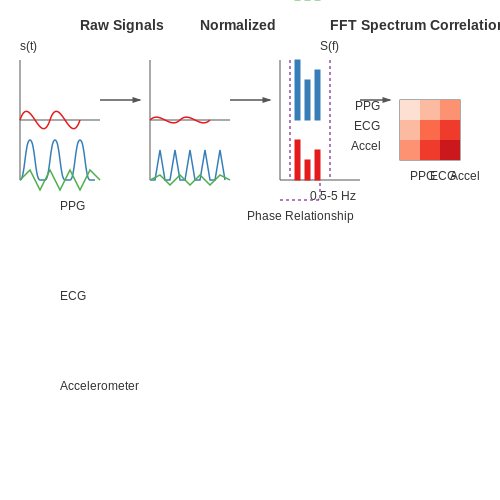
Multi-modal sensor data (e.g., PPG, ECG, accelerometer) requires temporal alignment and dimensionality reduction before model training. Edge Impulse's Digital Signal Processing (DSP) block performs:
- Time-domain normalization: Scaling signals to zero mean and unit variance
- Frequency analysis: Computing FFT for spectral features
- Cross-sensor correlation: Identifying phase relationships between signals
where s(t) represents the raw sensor signal and S(f) its frequency-domain representation. The spectral power between 0.5-5 Hz is typically retained for cardiovascular monitoring.
Model Architecture Optimization
Convolutional Neural Networks (CNNs) with depthwise separable layers achieve 93% accuracy in heartbeat classification while reducing parameters by 4× compared to standard architectures. The following configuration demonstrates optimal performance for ARM Cortex-M4F processors:
- Input layer: 3-channel 128-sample window
- DepthwiseConv1D (kernel=5, filters=8)
- PointwiseConv1D (filters=16)
- GlobalAveragePooling1D
- Dense (8 units, ReLU)
import tensorflow as tf
from tensorflow.keras import layers

model = tf.keras.Sequential([
    layers.InputLayer(input_shape=(128, 3)),
    layers.DepthwiseConv1D(kernel_size=5, depth_multiplier=8),
    layers.Conv1D(filters=16, kernel_size=1),
    layers.GlobalAveragePooling1D(),
    layers.Dense(8, activation='relu'),
    layers.Dense(3, activation='softmax')
])
Energy-Efficient Inference
Quantization-aware training reduces model size by 75% with less than 2% accuracy drop. The energy consumption E scales with:
where C is the computational capacitance, V the operating voltage, and Nops the number of operations. Edge Impulse's EON Compiler achieves 0.8 mJ per inference at 8-bit quantization on Nordic nRF52840.
Clinical Validation Requirements
Deployable models must exceed the following performance metrics on holdout test sets:
| Metric | Threshold |
|---|---|
| Sensitivity | >95% |
| Specificity | >90% |
| PPV | >88% |
Continuous monitoring applications require additional testing under motion artifacts, with signal-to-noise ratio (SNR) maintained above 15 dB during walking.
7. Official Edge Impulse Documentation
7.1 Official Edge Impulse Documentation
- Edge Impulse Brings TinyML to Millions of Arduino Developers — Launch the Edge Impulse daemon to connect your board to Edge Impulse. Open a terminal or command prompt and run: $$ npm install edge-impulse-cli -g $$ edge-impulse-daemon. Your device now shows in the Edge Impulse studio on the Devices tab, ready for you to collect some data and build a model.
- Syntiant Tiny ML Board | Edge Impulse Documentation — The TinyML Board is a with a microphone and accelerometer, USB host microcontroller and an always-on Neural Decision Processor™, featuring ultra low-power consumption, a fully connected neural network architecture, and fully supported by Edge Impulse. You'll be able to sample raw data, build models, and deploy trained embedded machine learning models directly from the Edge Impulse studio to ...
- 4.1 Understanding TinyML and Edge Impulse Studio - GitHub Pages — You can visit Edge Impulse's official website for more information about this tool and check the official documentation for a basic explanation. In the following sections, we will learn to achieve continuous motion recognition with the on-board 6-axis accelerometer of the XIAO nRF52840 Sense shown below and voice keyword wake-up functionality ...
- ESP32-CAM Object Detection with Edge Impulse - DroneBot Workshop — You have just trained an ML model using the images you took and Edge Impulse! Export to Arduino Library. The final step with Edge Impulse is to export our ML model as an Arduino Library. We can then use this library with the Arduino IDE to program our ESP32-CAM board. Look for the Deployment menu item on the left side menu, and click on it.
- Edge Impulse: An MLOps Platform for Tiny Machine Learning — Edge Impulse is a cloud-based machine learning operations (MLOps) platform for developing embedded and edge ML (TinyML) systems that can be deployed to a wide range of hardware targets.
- GitHub - edgeimpulse/courseware-embedded-machine-learning — Introduction to Embedded Machine Learning - Coursera course by Edge Impulse that introduces neural networks and deep learning concepts and applies them to embedded systems. Hands-on projects rely on training and deploying machine learning models with Edge Impulse. Free with optional paid certificate.
- Edge Impulse and TinyML on Raspberry Pi — Raspberry Pi is probably the most affordable way to get started with embedded machine learning. The inferencing performance we see with Raspberry Pi 4 is comparable to or better than some of the new accelerator hardware, but your overall hardware cost is just that much lower.. Raspberry Pi 4 Model B. However, training custom models on Raspberry Pi — or any edge platform, come to that — is ...
- PDF Introduction to Machine Learning with Edge Impulse - Silicon Labs — Edge Impulse to access the computer's microphone. • To connect a mobile phone, click [Show QR code] next to the "Use your mobile phone" option and a QR code will appear. ... For this lab, we will be training our model to recognize the keyoword phrases "Silicon Labs" and "Wireless Gecko." Since the data acquisition requires about ...
- Getting Started with Edge Impulse — TinyML by Edge Impulse. Imagine wanting to sense when a certain gesture occurs on a microcontroller. Normally, this would be accomplished by gathering training data from a sensor, labeling it, and then using a script to train a model and then deploy it. This workflow takes a lot of time and can be very daunting to beginners.
7.2 Research Papers on TinyML
- Edge Impulse: TinyML Language Classification Model — This research explores the implementation of TinyML for conveyor belt systems using Edge Impulse software. ... model design, training and testing done sequentially to suit our purpose, with getting the results of accurate identification of 4 languages Arabic, Chinese, Hindi and English along with processing time of 1ms and RAM consumption of ...
- A review on TinyML: State-of-the-art and prospects — Edge Impulse: It is a cloud service for developing machine learning models in the TinyML targeted edge devices. This supports AutoML processing for edge platforms (Edge Impulse, 2021). It also supports a number of boards including smart phones to deploy learning models in such devices.
- Edge Impulse: An MLOps Platform for Tiny Machine Learning — Edge Impulse is a cloud-based machine learning operations (MLOps) platform for developing embedded and edge ML (TinyML) systems that can be deployed to a wide range of hardware targets. Current TinyML workflows are plagued by fragmented software stacks and heterogeneous deployment hardware, making ML model optimizations difficult and unportable. We present Edge Impulse, a practical MLOps ...
- Edge Impulse: An MLOps Platform for Tiny Machine Learning - arXiv.org — Edge Impulse targets customers in the business sector who want to develop edge machine learning (ML) solutions for a variety of problems. However, the Edge Impulse platform also facilitates a research- and classroom-friendly environment. Figure1illustrates the end-to-end ML workflow of Edge Impulse. Edge Impulse simplifies the process of data ...
- TinyML Gamma Radiation Classifier - ScienceDirect — We employ a TinyML model designed using Edge Impulse (EI), for the purpose of spectra classification. Designing a TinyML model using EI involves adopting a specific data format for training and results in a model that can be implemented in a variety of embedded systems for real-world deployment.
- Widening Access to Applied Machine Learning With TinyML — Also, with the recent integration of CodeCraft and Edge Impulse it is now possible to develop TinyML applications using visual programming abstractions, which will open up new exciting opportunities to bring TinyML into K12 classrooms. Moving forward, we are excited to continue working to make TinyML accessible for all.
- PDF "Getting Started with TinyML: Train and Deploy TinyML projects with ... — to get started with tinyML using the Edge Impulse tool. Daniel is the Founding tinyML engineer at Edge Impulse. He's co-author of the O'Reilly book tinyML, alongside Pete Warden. He previously worked on the Tensor Flow team at Google, and he co-founded Tiny Farms Inc., deploying machine learning on industrial scale insect farms.
- Unlocking Edge Intelligence Through Tiny Machine Learning (TinyML ... — Machine Learning (ML) on the edge is key to enabling a new breed of IoT and autonomous system applications. The departure from the traditional cloud-centric architecture means that new deployments can be more power-efficient, provide better privacy and reduce latency for inference. At the core of this paradigm is TinyML, a framework allowing the execution of ML models on low-power embedded ...
- PDF Exploring opportunities in TinyML - UPC Universitat Politècnica de ... — Este proyecto estudia el TinyML y dos de sus t´ecnicas, de lo que llamamos TinyML On-Device LearningoTiny-ODL, capaces de entrenar el model de ML en el mismo dispotivio (on-device learning):TinyML with Online-Learning(TinyOL) yFederated Learn-ing(FL). Se estudian las dos t´ecnicas desde un an´aisis te´orico y probamos de
- PDF TinyML: From Basic to Advanced Applications — model on a microcontroller following an online learning approach. And the third, a federated learning program able to train a single global model with the aggrega-
7.3 Community Forums and Tutorials
- Wio Terminal TinyML Course - Edge Impulse Forum — Hello, Edge Impulse Community! I am making a series of video tutorials about using Edge Impulse with Seeed Studio boards (Cortex M4F Wio Terminal and Cortex M0+ XIAO). All in all I plan on making 7 videos, 2 are already published. First video is an intro explaining how to install edge-impulse-cli and general Edge Impulse workflow + a proof-of-concept gesture recognizer with just a single light ...
- PDF TinyML Optimization Approaches for Deployment on Edge Devices - Cyient — Model Pre-processing and Training 6 Optimization Techniques 7 Data Set 7 Results 11 Conclusion 12 Key Insights 12 About the Authors 13 ... compressed deep learning models optimized for TinyML on edge devices, addressing the growing demand for efficient and lightweight machine learning solutions
- Syntiant Tiny ML Board | Edge Impulse Documentation — The TinyML Board is a with a microphone and accelerometer, USB host microcontroller and an always-on Neural Decision Processor™, featuring ultra low-power consumption, a fully connected neural network architecture, and fully supported by Edge Impulse. You'll be able to sample raw data, build models, and deploy trained embedded machine learning models directly from the Edge Impulse studio to ...
- Getting Started with TinyML by Edge Impulse - Hackster.io — Learn how to use Edge Impulse's TinyML platform to gather data, train a model, and deploy it to a device of your choice. ... I decided to change the default confidence threshold from 80% up to 91%. After training the model, I was able to view a graph of what the model came up with. Then I went to the "Classification" page and gathered a bit ...
- Edge Impulse Brings TinyML to Millions of Arduino Developers — $$ npm install edge-impulse-cli -g $$ edge-impulse-daemon. Your device now shows in the Edge Impulse studio on the Devices tab, ready for you to collect some data and build a model. We've put together two end-to-end tutorials: detect gestures with the accelerometer or detect audio events with the microphone.
- Action-Recognition-TinyML-Edge_Impulse - GitHub — Platform for developing embedded and edge ML (TinyML) systems that can be deployed to a wide range of hardware targets. Perform the kitchen actions to collect data using Edge Impulse collect high-frequency data from real sensors, use signal processing to clean up data, build a neural network classifier, and how to deploy your model back to a ...
- Edge Impulse and TinyML on Raspberry Pi — Raspberry Pi is probably the most affordable way to get started with embedded machine learning. The inferencing performance we see with Raspberry Pi 4 is comparable to or better than some of the new accelerator hardware, but your overall hardware cost is just that much lower.. Raspberry Pi 4 Model B. However, training custom models on Raspberry Pi — or any edge platform, come to that — is ...
- PDF "Getting Started with TinyML: Train and Deploy TinyML projects with ... — to get started with tinyML using the Edge Impulse tool. Daniel is the Founding tinyML engineer at Edge Impulse. He's co-author of the O'Reilly book tinyML, alongside Pete Warden. He previously worked on the Tensor Flow team at Google, and he co-founded Tiny Farms Inc., deploying machine learning on industrial scale insect farms.
- GitHub - edgeimpulse/courseware-embedded-machine-learning — Content from and cover hands-on demonstrations and projects using Edge Impulse to deploy machine learning models to embedded systems. Content is divided into separate modules . Each module is assumed to be about a week's worth of material, and each section within a module contains about 60 minutes of presentation material.
- TinyML Video Tutorial Course - Machine Learning on Embedded ... - Reddit — TinyML is subset of ML on the Edge or Embedded Machine Learning, specifically focused on running inference on low-power MCUs. I am making a series of video tutorials about using Edge Impulse with Seeed Studio boards (Cortex M4F Wio Terminal and Cortex M0+ XIAO) - however you can port these projects to other supported boards if you want, the ...